
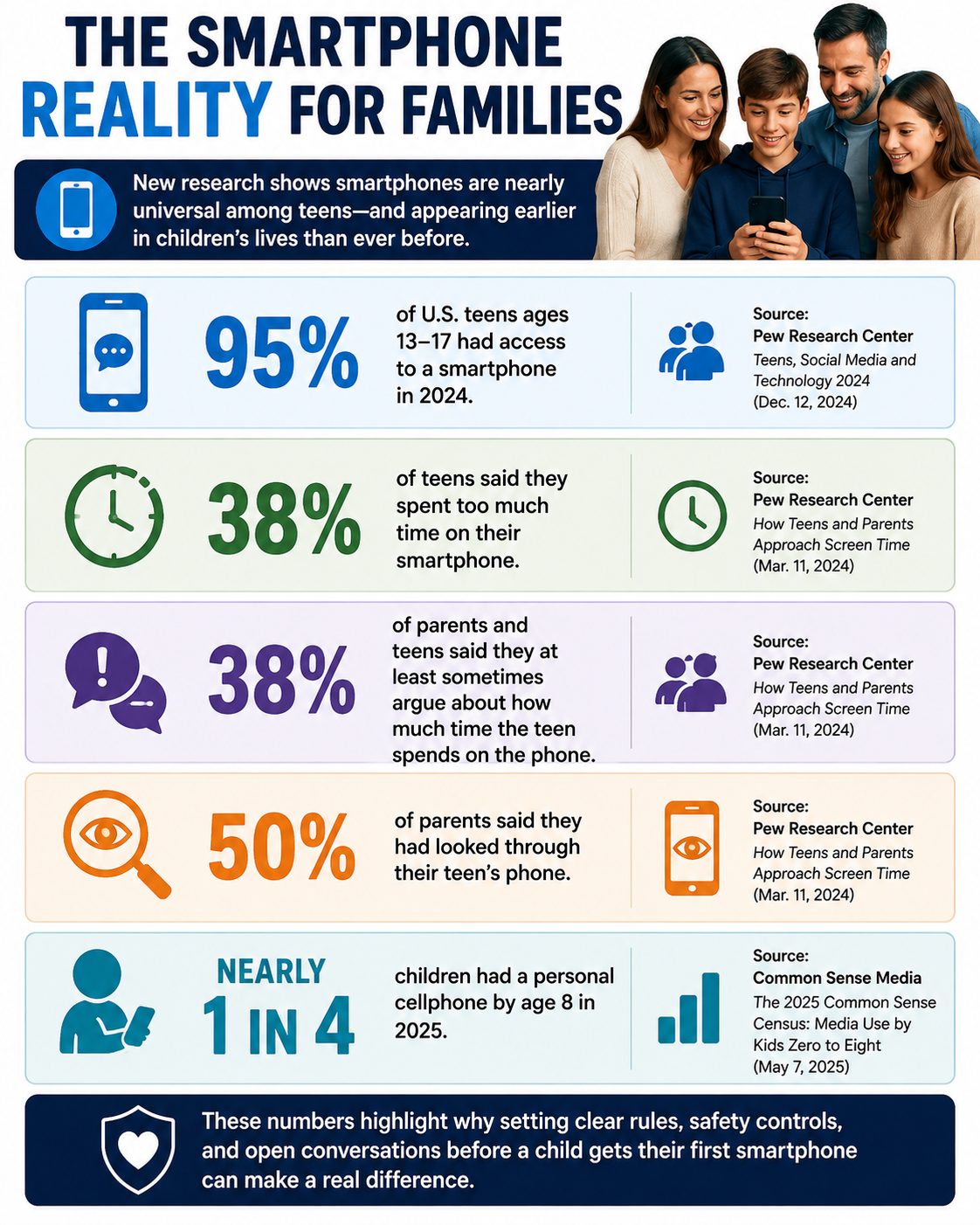
Giving a child their first smartphone can solve a practical problem—suddenly they can call after practice, text when plans change, and reach you in an emergency. But it also places apps, messaging, cameras, location sharing, purchases, strangers, and a nearly unlimited internet connection in their pocket. Smartphone access is nearly universal among teenagers: Pew Research Center found 95% of U.S. teens ages 13 to 17 had access to one in 2024. And the transition is beginning much earlier for some families, with Common Sense Media’s 2025 census finding nearly one in four children had a personal cellphone by age 8. Before activating a child’s first smartphone, parents can make six decisions that may prevent some of the biggest arguments and safety problems later.
1. Decide Whether Your Child Needs a Smartphone—or Just a Phone
There is no single age at which every child suddenly becomes ready for a smartphone. The American Academy of Pediatrics recommends considering the child’s maturity, how they plan to use the device, and whether they’re prepared for problems that can accompany internet access rather than relying solely on age. Start with the problem you’re actually trying to solve: Does your 10-year-old need to contact you after soccer practice, or do they need unrestricted access to social media, games, web browsers, and app stores? Those are very different needs, and a basic phone, calling-enabled watch, or more restricted device may solve the first without automatically providing the second. Think of smartphone access as something that can expand over time rather than a package of privileges that must all arrive on the child’s birthday.
Is Your Child Smartphone Ready?
| Question | Why It Matters |
|---|---|
| Do they usually follow household rules? | Phone limits require self-control |
| Can they keep track of belongings? | Smartphones are expensive and portable |
| Will they tell you when something online feels wrong? | Secrecy can make problems harder to address |
| Can they stop using screens when asked? | Transitioning away from the device matters |
| Do they understand basic privacy? | Phones collect and share substantial information |
| Do they actually need internet/app access? | Communication may require only a basic device |
| Can they handle gradually increasing freedom? | Controls can loosen as responsibility improves |
The American Academy of Pediatrics actually offers families a PhoneReady questionnaire designed to assess behavior, developmental maturity and family values rather than declaring one universal “right age.”
2. Write the Smartphone Rules Before the Phone Arrives
Trying to establish limits after a child has spent three unrestricted weeks with a new smartphone can be much harder than agreeing on expectations beforehand. It is recommended that families create screen-free zones, use parental controls, turn off unnecessary notifications and autoplay, protect bedtime, and establish rules that apply to adults as well as children. Decide whether phones are allowed at dinner, during homework, after bedtime and behind closed bedroom doors, as well as who can approve new apps and purchases. Also establish consequences in advance—for example, downloading an unapproved app might temporarily remove app-store access rather than triggering an unpredictable punishment invented during an argument. Put the rules in writing, revisit them periodically, and loosen restrictions when your child demonstrates that they can handle additional independence.
A First-Phone Agreement Should Cover
- Bedtime: Where does the phone charge overnight?
- Apps: Who approves downloads?
- Purchases: Are in-app purchases allowed?
- Social media: Which platforms, if any, are permitted?
- Location: Who can see the child’s location?
- Privacy: What information should never be shared?
- School: When must the phone stay away?
- Monitoring: What are parents allowed to review?
- Consequences: What happens when a rule is broken?
- Emergency rule: When can the child come to a parent without fearing immediate loss of the phone?
3. Set Up Privacy, Purchases and Parental Controls Together
Don’t hand over a factory-fresh smartphone and assume the default settings are appropriate for a child. Before the device becomes everyday equipment, review app-download permissions, purchases, location sharing, contacts, web filtering, screen-time limits, camera and microphone permissions, account recovery information, and parental controls. For children under 13, the federal Children’s Online Privacy Protection Act provides protections involving how covered websites and online services collect personal information, including parental-consent requirements in applicable circumstances. Make app permissions a teaching exercise: if a simple game wants permanent access to contacts, photos, microphone and precise location, ask your child why the app might want those things and whether they’re necessary. Setting controls together makes the process less about secretly watching a child and more about teaching them the privacy questions they’ll eventually need to answer without you.
4. Teach the “Show Me, Don’t Hide It” Rule
A child’s first uncomfortable smartphone experience may not involve an obvious stranger asking suspicious questions. It could be a classmate sharing an embarrassing photo, a fake “free gift” text, a phishing link, sexual content appearing unexpectedly, pressure to send a private image, bullying in a group chat, or an adult pretending to be younger. The Federal Trade Commission recommends teaching children not to respond to unknown senders, click unexpected links or attachments, or provide personal or financial information in response to unsolicited messages. Parents should also establish one crucial rule: if something frightening, sexual, threatening, embarrassing or suspicious appears, the child can show an adult without automatically losing the phone simply for reporting it. A child who believes asking for help guarantees punishment has a powerful incentive to hide exactly the situation a parent most needs to know about.
5. Give the Phone a Bedtime—and a Place to Sleep
One of the easiest smartphone boundaries to understand is that the phone doesn’t need to sleep beside the child. You should aim for screen-free periods before bed and emphasize protecting sleep when families develop media plans. Choose a consistent charging location outside the bedroom—a kitchen counter, hallway charging station or parent’s room—and decide when the phone goes there each night. This removes the temptation to answer one more message, watch another video or respond to notifications after lights-out without requiring parents to police every minute of screen use. The rule will also be easier to defend if adults occasionally put their own phones away and demonstrate that being unreachable for part of the evening is normal.
6. Decide How Monitoring Will Change as Your Child Gets Older
Giving a child a smartphone should begin an ongoing conversation rather than end parental involvement. Pew Research Center found half of surveyed parents had looked through their teen’s phone, but monitoring was much more common among parents of 13- and 14-year-olds than parents of 15- to 17-year-olds. Tell your child upfront what you may review—apps, screen time, purchases, contacts or other activity—rather than secretly inventing surveillance rules after a problem occurs. Schedule brief check-ins during the first few months to talk about new apps, strange messages, social pressure, screen habits and anything online that has made the child uncomfortable. As judgment improves, parents can gradually loosen controls so that the smartphone becomes practice for independent digital decision-making rather than a device that remains permanently controlled by an adult.
The 10-Minute First Smartphone Setup
Before your child starts using the phone:
- Turn on parental controls.
- Require approval for app downloads and purchases.
- Review location-sharing settings.
- Check camera, microphone, photo and contact permissions.
- Configure web/content restrictions appropriate for the child.
- Set screen-time or downtime schedules.
- Turn off unnecessary notifications and autoplay.
- Establish the overnight charging location.
- Add important family/emergency contacts.
- Review the family’s “show me, don’t hide it” rule.
The FTC specifically encourages parents to decide what children may do with the phone, who may contact them, what apps they can download and what parental-control features are appropriate.
A First Smartphone Should Come With Training Wheels
A child’s first smartphone does not have to arrive with unrestricted access to every feature the device offers. Parents can begin with communication and essential apps, add privileges gradually, and adjust controls as a child demonstrates responsibility. It’s a good idea to treat a first phone somewhat like an experiment, with independence increasing as children show they’re ready for it. The most important preparation may not be a particular parental-control setting at all, but establishing a relationship in which children know they can ask for help when something online goes wrong. The goal isn’t to control every tap forever; it’s to help a child eventually use the technology safely without needing you to do it for them.
How old was your child when they got their first phone, and what’s the one rule you wish you’d established from day one?
What to Read Next
Why Some Parents Are Delaying Smartphones Longer Than Ever
Should Your Child Really Have a Smartphone Before School Starts?

Evan Morgan has been a full-time freelance writer and editor for 10+ years. When not working, he enjoys catching the latest true crime documentary or getting lost in a good book.
