
• Home
  • About Us
  • Toolkit
  • Archives
  • Advertise
  • Privacy Policy

Kids Ain't Cheap

But They Sure Are Worth It

  • Parenting
    • Baby Stuff
    • Books and Reading
      • Aesops Fables
      • Comic Books
    • Education
    • Family Time
    • Green Living
    • Growing Up
    • Healthy Living & Eating
    • Holidays
    • Parenting
    • Random Musings
    • Shopping
    • Stuff to Do
  • Money
  • Product Reviews
    • Books and Magazines
    • Discount Sites
    • Furniture
    • House Keeping
    • Reviews News
    • Toys and Games
  • Contact Us
  • Our Editorial Commitment
  • Search

Before You Give Your Child Their First Smartphone, Do These 6 Things

August 19, 2026 | Leave a Comment

Girl Using Smartphone
A child’s first smartphone brings new independence along with responsibilities involving privacy, screen time, online safety, and healthy digital habits. Setting clear expectations before handing over the device can help families avoid problems later. (Unsplash).

Giving a child their first smartphone can solve a practical problem—suddenly they can call after practice, text when plans change, and reach you in an emergency. But it also places apps, messaging, cameras, location sharing, purchases, strangers, and a nearly unlimited internet connection in their pocket. Smartphone access is nearly universal among teenagers: Pew Research Center found 95% of U.S. teens ages 13 to 17 had access to one in 2024. And the transition is beginning much earlier for some families, with Common Sense Media’s 2025 census finding nearly one in four children had a personal cellphone by age 8. Before activating a child’s first smartphone, parents can make six decisions that may prevent some of the biggest arguments and safety problems later.

1. Decide Whether Your Child Needs a Smartphone—or Just a Phone

There is no single age at which every child suddenly becomes ready for a smartphone. The American Academy of Pediatrics recommends considering the child’s maturity, how they plan to use the device, and whether they’re prepared for problems that can accompany internet access rather than relying solely on age. Start with the problem you’re actually trying to solve: Does your 10-year-old need to contact you after soccer practice, or do they need unrestricted access to social media, games, web browsers, and app stores? Those are very different needs, and a basic phone, calling-enabled watch, or more restricted device may solve the first without automatically providing the second. Think of smartphone access as something that can expand over time rather than a package of privileges that must all arrive on the child’s birthday.

Is Your Child Smartphone Ready?

QuestionWhy It Matters
Do they usually follow household rules?Phone limits require self-control
Can they keep track of belongings?Smartphones are expensive and portable
Will they tell you when something online feels wrong?Secrecy can make problems harder to address
Can they stop using screens when asked?Transitioning away from the device matters
Do they understand basic privacy?Phones collect and share substantial information
Do they actually need internet/app access?Communication may require only a basic device
Can they handle gradually increasing freedom?Controls can loosen as responsibility improves

The American Academy of Pediatrics actually offers families a PhoneReady questionnaire designed to assess behavior, developmental maturity and family values rather than declaring one universal “right age.”

2. Write the Smartphone Rules Before the Phone Arrives

Trying to establish limits after a child has spent three unrestricted weeks with a new smartphone can be much harder than agreeing on expectations beforehand. It is recommended that families create screen-free zones, use parental controls, turn off unnecessary notifications and autoplay, protect bedtime, and establish rules that apply to adults as well as children. Decide whether phones are allowed at dinner, during homework, after bedtime and behind closed bedroom doors, as well as who can approve new apps and purchases. Also establish consequences in advance—for example, downloading an unapproved app might temporarily remove app-store access rather than triggering an unpredictable punishment invented during an argument. Put the rules in writing, revisit them periodically, and loosen restrictions when your child demonstrates that they can handle additional independence.

A First-Phone Agreement Should Cover

  • Bedtime: Where does the phone charge overnight?
  • Apps: Who approves downloads?
  • Purchases: Are in-app purchases allowed?
  • Social media: Which platforms, if any, are permitted?
  • Location: Who can see the child’s location?
  • Privacy: What information should never be shared?
  • School: When must the phone stay away?
  • Monitoring: What are parents allowed to review?
  • Consequences: What happens when a rule is broken?
  • Emergency rule: When can the child come to a parent without fearing immediate loss of the phone?

3. Set Up Privacy, Purchases and Parental Controls Together

Don’t hand over a factory-fresh smartphone and assume the default settings are appropriate for a child. Before the device becomes everyday equipment, review app-download permissions, purchases, location sharing, contacts, web filtering, screen-time limits, camera and microphone permissions, account recovery information, and parental controls. For children under 13, the federal Children’s Online Privacy Protection Act provides protections involving how covered websites and online services collect personal information, including parental-consent requirements in applicable circumstances. Make app permissions a teaching exercise: if a simple game wants permanent access to contacts, photos, microphone and precise location, ask your child why the app might want those things and whether they’re necessary. Setting controls together makes the process less about secretly watching a child and more about teaching them the privacy questions they’ll eventually need to answer without you.

4. Teach the “Show Me, Don’t Hide It” Rule

A child’s first uncomfortable smartphone experience may not involve an obvious stranger asking suspicious questions. It could be a classmate sharing an embarrassing photo, a fake “free gift” text, a phishing link, sexual content appearing unexpectedly, pressure to send a private image, bullying in a group chat, or an adult pretending to be younger. The Federal Trade Commission recommends teaching children not to respond to unknown senders, click unexpected links or attachments, or provide personal or financial information in response to unsolicited messages. Parents should also establish one crucial rule: if something frightening, sexual, threatening, embarrassing or suspicious appears, the child can show an adult without automatically losing the phone simply for reporting it. A child who believes asking for help guarantees punishment has a powerful incentive to hide exactly the situation a parent most needs to know about.

5. Give the Phone a Bedtime—and a Place to Sleep

One of the easiest smartphone boundaries to understand is that the phone doesn’t need to sleep beside the child. You should aim for screen-free periods before bed and emphasize protecting sleep when families develop media plans. Choose a consistent charging location outside the bedroom—a kitchen counter, hallway charging station or parent’s room—and decide when the phone goes there each night. This removes the temptation to answer one more message, watch another video or respond to notifications after lights-out without requiring parents to police every minute of screen use. The rule will also be easier to defend if adults occasionally put their own phones away and demonstrate that being unreachable for part of the evening is normal.

6. Decide How Monitoring Will Change as Your Child Gets Older

Giving a child a smartphone should begin an ongoing conversation rather than end parental involvement. Pew Research Center found half of surveyed parents had looked through their teen’s phone, but monitoring was much more common among parents of 13- and 14-year-olds than parents of 15- to 17-year-olds. Tell your child upfront what you may review—apps, screen time, purchases, contacts or other activity—rather than secretly inventing surveillance rules after a problem occurs. Schedule brief check-ins during the first few months to talk about new apps, strange messages, social pressure, screen habits and anything online that has made the child uncomfortable. As judgment improves, parents can gradually loosen controls so that the smartphone becomes practice for independent digital decision-making rather than a device that remains permanently controlled by an adult.
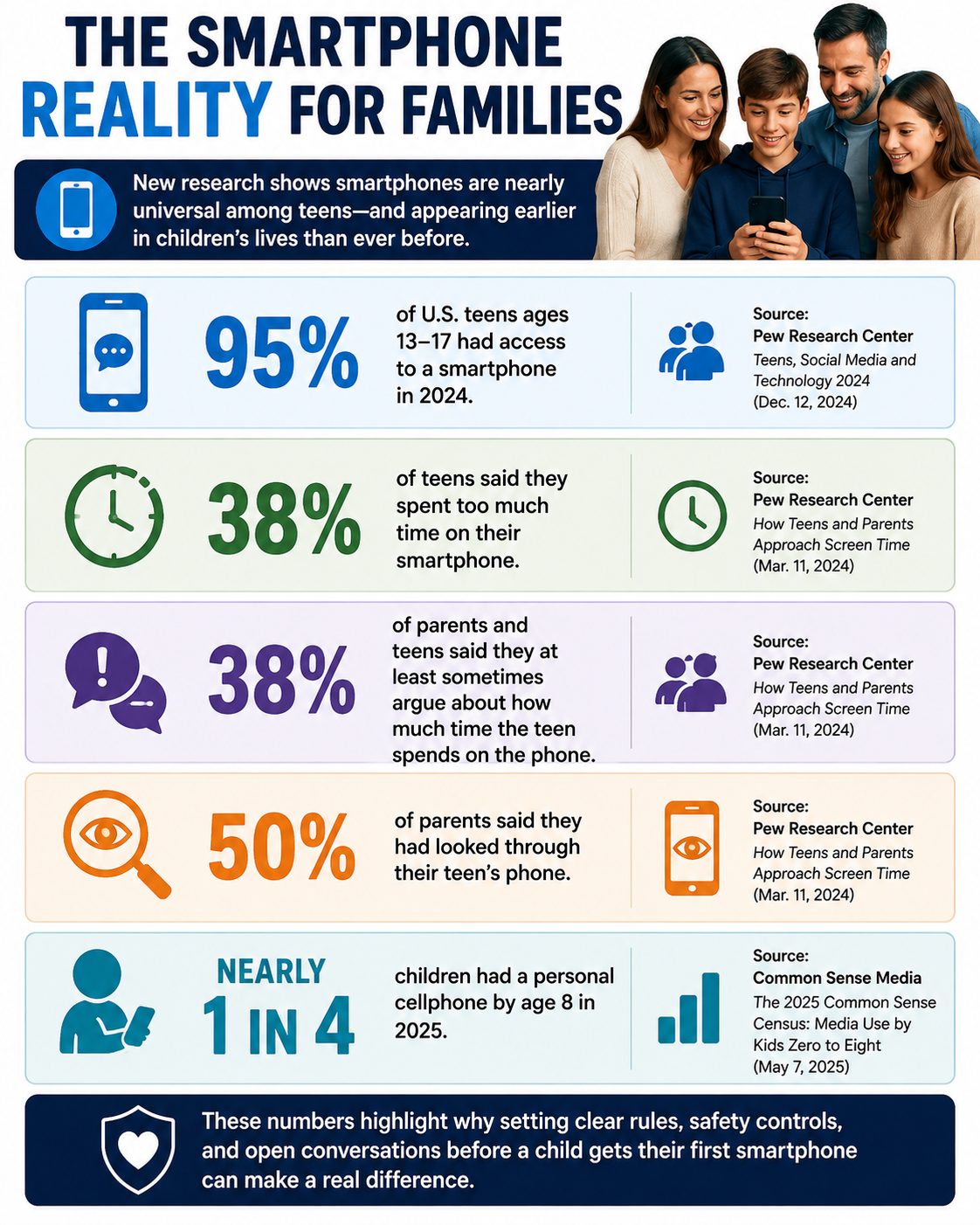
Smartphone Reality

The 10-Minute First Smartphone Setup

Before your child starts using the phone:

  1. Turn on parental controls.
  2. Require approval for app downloads and purchases.
  3. Review location-sharing settings.
  4. Check camera, microphone, photo and contact permissions.
  5. Configure web/content restrictions appropriate for the child.
  6. Set screen-time or downtime schedules.
  7. Turn off unnecessary notifications and autoplay.
  8. Establish the overnight charging location.
  9. Add important family/emergency contacts.
  10. Review the family’s “show me, don’t hide it” rule.

The FTC specifically encourages parents to decide what children may do with the phone, who may contact them, what apps they can download and what parental-control features are appropriate.

A First Smartphone Should Come With Training Wheels

A child’s first smartphone does not have to arrive with unrestricted access to every feature the device offers. Parents can begin with communication and essential apps, add privileges gradually, and adjust controls as a child demonstrates responsibility. It’s a good idea to treat a first phone somewhat like an experiment, with independence increasing as children show they’re ready for it. The most important preparation may not be a particular parental-control setting at all, but establishing a relationship in which children know they can ask for help when something online goes wrong. The goal isn’t to control every tap forever; it’s to help a child eventually use the technology safely without needing you to do it for them.

How old was your child when they got their first phone, and what’s the one rule you wish you’d established from day one?

What to Read Next

Why Some Parents Are Delaying Smartphones Longer Than Ever

Should Your Child Really Have a Smartphone Before School Starts?

Phone-Free Schools Act: New Policies Limit Student Smartphone Use to Curb Distraction and Cyberbullying

Evan Morgan

Evan Morgan has been a full-time freelance writer and editor for 10+ years. When not working, he enjoys catching the latest true crime documentary or getting lost in a good book.

Filed Under: Parenting Tagged With: child safety, children and technology, digital parenting, first smartphone, Internet Safety, Online Safety, parental controls, Parenting, Screen Time, smartphones

Experts Say Summer Screen Time Can Spiral Faster Than Parents Realize

June 5, 2026 | Leave a Comment

Young Girl On Tablet
Children often spend significantly more time on devices during summer break when daily routines disappear. Experts recommend balancing screen use with outdoor play, physical activity, and family interaction. Pexels.

As school doors close and long summer days begin, many families find themselves relaxing rules around devices. A few extra minutes on a tablet can quickly become hours spent scrolling videos, gaming, or chatting online. Experts say summer screen time often increases faster than parents expect because daily routines, school schedules, and structured activities temporarily disappear. What starts as harmless entertainment can gradually replace physical activity, social interaction, and even healthy sleep habits. For parents, recognizing how quickly screen use can escalate is the first step toward maintaining a healthy balance.

Why Summer Creates the Perfect Storm for Excessive Screen Use

Summer offers children more free time than any other season, which naturally increases opportunities to use screens. Without homework, early bedtimes, and classroom schedules, many kids turn to digital entertainment to fill empty hours. According to Common Sense Media, tweens average more than five hours of daily screen media use, while teens average more than eight hours, excluding school-related activities. During summer break, those numbers can climb even higher when structure disappears. Experts note that screen habits often build gradually, making it difficult for parents to notice the increase until it becomes a daily routine.

The Hidden Effects Parents Often Miss

Many parents focus on the total amount of screen time but overlook how it affects other areas of life. Excessive screen use can interfere with sleep schedules, reduce physical activity, and limit face-to-face interactions with family and friends. Health experts continue to emphasize that screen use becomes problematic when it replaces essential activities such as exercise, reading, outdoor play, or adequate rest. Children may also become more irritable when devices are removed after extended use. These subtle changes often appear gradually, making them easy to dismiss as normal summer behavior.

Not All Screen Time Is Created Equal

Experts stress that parents should focus on screen quality as much as screen quantity. A child participating in a virtual art class or educational program is having a different experience than one endlessly scrolling short-form videos. The American Academy of Pediatrics has moved toward encouraging families to create personalized media plans rather than relying solely on strict hourly limits. Parents should consider what content their children consume, how they engage with it, and whether it supports learning or creativity. Looking at the purpose behind screen use often provides a clearer picture than simply counting hours.

Practical Ways to Keep Summer Screen Time in Check

Creating structure remains one of the most effective ways to manage summer screen time. Families can establish screen-free blocks during meals, outdoor activities, and the hour before bedtime. Experts also recommend encouraging children to earn screen privileges through reading, chores, sports, or creative projects. A simple schedule that includes outdoor play, social activities, and family time can significantly reduce the temptation to spend the entire day on devices. Consistency matters more than perfection, and small daily boundaries often work better than sudden restrictions.

Why Parents Should Model Healthy Digital Habits

Children pay close attention to how adults use technology. When parents constantly check phones during meals or conversations, kids receive the message that screens deserve priority attention. Experts recommend creating family-wide expectations that apply to everyone, not just children. This might include device-free dinners, designated charging stations outside bedrooms, or family activities that do not involve screens. When parents model healthy habits, children are more likely to accept and follow similar expectations.

The Summer Habits That Often Last Beyond August

The routines children develop during summer frequently carry into the school year. If excessive screen use becomes the norm for several months, returning to structured schedules in the fall can be challenging. Experts recommend addressing unhealthy habits early before they become deeply ingrained. Families that establish clear expectations, encourage diverse activities, and regularly discuss digital habits often find it easier to maintain balance year-round. Summer should be a season of exploration and connection, not one dominated entirely by screens.

What changes have you made to manage summer screen time in your home, and have they worked? Share your experiences and tips in the comments to help other families navigate the challenges of summer screen time.

What to Read Next

Occupational Therapists Say Screen Overload Is Affecting Younger Kids Faster

Arizona Parents: Early Childhood Screening Efforts Expand

Screen Time Isn’t Causing Autism — But It Can Cause Autism-Like Delays

Evan Morgan

Evan Morgan has been a full-time freelance writer and editor for 10+ years. When not working, he enjoys catching the latest true crime documentary or getting lost in a good book.

Filed Under: Parenting Tagged With: child development, children and technology, digital wellness, family health, healthy habits, parenting advice, parenting tips, screen time limits, summer parenting, summer screen time

  • Facebook
  • Pinterest
  • RSS
  • Twitter

Basic Principles Of Good Parenting

Here some basic principles for good parenting:

  1. What You Do Matters: Your kids are watching you. So, be purposeful about what you want to accomplish.
  2. You Can’t be Too Loving: Don’t replace love with material possessions, lowered expectations or leniency.
  3. Be Involved Your Kids Life: Arrange your priorities to focus on what your kid’s needs. Be there mentally and physically.
  4. Adapt Your Parenting: Children grow quickly, so keep pace with your child’s development.
  5. Establish and Set Rules: The rules you set for children will establish the rules they set for themselves later.  Avoid harsh discipline and be consistent.
  6. Explain Your Decisions: What is obvious to you may not be evident to your child. They don’t have the experience you do.
  7. Be Respectful To Your Child: How you treat your child is how they will treat others.  Be polite, respectful and make an effort to pay attention.
Best Parenting Blogs

Most Popular

11 Ways Kids Are Outsmarting Parental Controls 1. Using Alternate Devices One common trick is simply turning to another device. If a child’s main phone or tablet is restricted, they may borrow a sibling’s, friend’s, or even a school laptop. This instantly gives them access to content outside of parental oversight. Parents often focus on one device, forgetting that others in the household can serve as loopholes. Knowing this tactic helps families tighten controls across all electronics. 2. Clearing Browsing Histories Many kids quickly learn that clearing browsing history hides evidence of restricted activity. With just a few clicks, they can erase any trace of websites visited. This makes it harder for parents to notice when rules are being broken. Parents may assume no history means no browsing, but the reality is often the opposite. Kids are outsmarting parental controls by making it seem like nothing happened at all. 3. Using Private Browsing Modes Most browsers offer “incognito” or private browsing features. Kids use this mode to access websites without leaving a record in the history. To parents checking later, everything looks clean and safe. This simple trick is often one of the first ways kids discover how to bypass restrictions. Conversations about private browsing can help close this gap. 4. Guessing or Resetting Passwords Children who are persistent may try to guess passwords to parental control apps or accounts. Others may find ways to reset them through email prompts or security questions. Once inside, they can disable restrictions entirely. Parents may not even realize controls have been altered until much later. Stronger, less predictable passwords can make this more difficult. 5. Using VPNs to Hide Activity Virtual private networks, or VPNs, let kids disguise their online locations. With one downloaded app, they can bypass geographic or parental restrictions. Some children learn about VPNs through friends or even social media. This makes it easy for them to reach content that should be blocked. Parents often underestimate just how simple it is for kids to use these tools. 6. Creating Fake Accounts When parents monitor social media, kids may create hidden accounts. These “finstas” or fake profiles allow them to interact freely without parental oversight. While their main account appears harmless, the secondary one tells a different story. Kids are outsmarting parental controls by playing both sides at once. Checking for duplicate accounts can help parents stay more aware. 7. Exploiting Time Zone Settings Some kids change the time zone on their devices to bypass screen time limits. This trick allows them to gain extra hours of usage undetected. Parents may assume controls are working, but in reality, the child is bending the clock. It’s a clever loophole that highlights just how resourceful kids can be. Monitoring device settings regularly can catch this tactic. 8. Disabling or Uninstalling Apps Parental control apps can be deleted or disabled with surprising ease. Some kids even reinstall them before a parent checks, making it seem like nothing changed. Others may simply restrict permissions to prevent apps from functioning properly. When apps aren’t monitored closely, parents may not notice they’ve been tampered with. This shows the importance of consistent follow-up. 9. Turning to Friends for Access If a child can’t get past restrictions on their own, they may rely on friends. Visiting a friend’s house or borrowing their phone can give them a free pass. Parents often forget that peer environments can override restrictions set at home. This kind of social workaround is especially common with gaming or social media. Open conversations about trust and responsibility are essential. 10. Hiding Apps in Plain Sight Kids sometimes download apps that look innocent but serve as gateways to hidden activity. These apps may disguise themselves as calculators or utilities. In reality, they allow file storage, private messaging, or browser access. Parents glancing at a home screen may overlook them entirely. Learning to recognize these disguised apps can help parents stay informed. 11. Outpacing Parents’ Tech Knowledge Finally, kids often know more about devices than their parents do. Whether through YouTube tutorials, TikTok hacks, or peer groups, they quickly learn advanced workarounds. This knowledge gap means controls can be bypassed before parents even realize the loophole exists. Staying informed and continually learning about new technology is the best defense. Kids are outsmarting parental controls because they adapt faster than most adults. The Real Solution Lies Beyond Restrictions While controls and filters are important, no system is perfect. Kids will always find creative ways around barriers, making communication the strongest safeguard. Setting clear expectations, building trust, and having ongoing conversations about online behavior matter more than apps alone. Parents who combine technology with open dialogue create a safer digital environment. The goal isn’t to win a battle of wits but to build a relationship that keeps kids both safe and honest. Do you think kids are outsmarting parental controls faster than parents can keep up? Share your experiences in the comments below. What to Read Next... 6 Parenting Tech Shortcuts That Can Expose Your Child to Strangers How Much Screen Time Is Too Much—Legally Speaking? Is Your Child’s School Quietly Tracking Their Location Without Your Consent? How Much Screen Time Is Quietly Reshaping Childhood Behavior? Why Some Parents Are Being Investigated Over Homeschooling Records

11 Ways Kids Are Outsmarting Parental Controls

Catherine Reed
Smiling grandfather holding a happy baby indoors.

Why Grandparents Shouldn’t Babysit Their Grandkids Every Week – The Unspoken Issue

Samantha
Girl getting makeup done, referencing psychologist-approved age.

Wearing Makeup: Here Is the Age That Psychologists Agree It’s Okay for Girls to Wear Makeup

Samantha
birthday gifts

7 Birthday Gifts Your Child Should Never Bring to a Party

Latrice Perez

Babysitting Without Cash: 10 Ways to Barter Your Way Out of Childcare Costs

Ashleigh Clyde

All content on Kids Ain’t Cheap is for entertainment purposes only. By reading this blog, you agree that Kids Ain’t Cheap is not responsible for any actions taken after reading this blog. For the full disclaimer, see our privacy policy.

Please note that Kids Ain’t Cheap has financial relationships with some of the merchants mentioned here. Kids Ain’t Cheap is funded by banner advertising, commission sales and search optimization consulting.

Copyright © 2006–2026 | District Media | All Rights Reserved | Privacy Policy

Copyright © 2026 Runway Pro Theme by Viva la Violette