• Home
  • About Us
  • Toolkit
  • Archives
  • Advertise
  • Privacy Policy

Kids Ain't Cheap

But They Sure Are Worth It

  • Parenting
    • Baby Stuff
    • Books and Reading
      • Aesops Fables
      • Comic Books
    • Education
    • Family Time
    • Green Living
    • Growing Up
    • Healthy Living & Eating
    • Holidays
    • Parenting
    • Random Musings
    • Shopping
    • Stuff to Do
  • Money
  • Product Reviews
    • Books and Magazines
    • Discount Sites
    • Furniture
    • House Keeping
    • Reviews News
    • Toys and Games
  • Contact Us
  • Our Editorial Commitment
  • Search

Before You Give Your Child Their First Smartphone, Do These 6 Things

August 19, 2026 | Leave a Comment

Girl Using Smartphone
A child’s first smartphone brings new independence along with responsibilities involving privacy, screen time, online safety, and healthy digital habits. Setting clear expectations before handing over the device can help families avoid problems later. (Unsplash).

Giving a child their first smartphone can solve a practical problem—suddenly they can call after practice, text when plans change, and reach you in an emergency. But it also places apps, messaging, cameras, location sharing, purchases, strangers, and a nearly unlimited internet connection in their pocket. Smartphone access is nearly universal among teenagers: Pew Research Center found 95% of U.S. teens ages 13 to 17 had access to one in 2024. And the transition is beginning much earlier for some families, with Common Sense Media’s 2025 census finding nearly one in four children had a personal cellphone by age 8. Before activating a child’s first smartphone, parents can make six decisions that may prevent some of the biggest arguments and safety problems later.

1. Decide Whether Your Child Needs a Smartphone—or Just a Phone

There is no single age at which every child suddenly becomes ready for a smartphone. The American Academy of Pediatrics recommends considering the child’s maturity, how they plan to use the device, and whether they’re prepared for problems that can accompany internet access rather than relying solely on age. Start with the problem you’re actually trying to solve: Does your 10-year-old need to contact you after soccer practice, or do they need unrestricted access to social media, games, web browsers, and app stores? Those are very different needs, and a basic phone, calling-enabled watch, or more restricted device may solve the first without automatically providing the second. Think of smartphone access as something that can expand over time rather than a package of privileges that must all arrive on the child’s birthday.

Is Your Child Smartphone Ready?

QuestionWhy It Matters
Do they usually follow household rules?Phone limits require self-control
Can they keep track of belongings?Smartphones are expensive and portable
Will they tell you when something online feels wrong?Secrecy can make problems harder to address
Can they stop using screens when asked?Transitioning away from the device matters
Do they understand basic privacy?Phones collect and share substantial information
Do they actually need internet/app access?Communication may require only a basic device
Can they handle gradually increasing freedom?Controls can loosen as responsibility improves

The American Academy of Pediatrics actually offers families a PhoneReady questionnaire designed to assess behavior, developmental maturity and family values rather than declaring one universal “right age.”

2. Write the Smartphone Rules Before the Phone Arrives

Trying to establish limits after a child has spent three unrestricted weeks with a new smartphone can be much harder than agreeing on expectations beforehand. It is recommended that families create screen-free zones, use parental controls, turn off unnecessary notifications and autoplay, protect bedtime, and establish rules that apply to adults as well as children. Decide whether phones are allowed at dinner, during homework, after bedtime and behind closed bedroom doors, as well as who can approve new apps and purchases. Also establish consequences in advance—for example, downloading an unapproved app might temporarily remove app-store access rather than triggering an unpredictable punishment invented during an argument. Put the rules in writing, revisit them periodically, and loosen restrictions when your child demonstrates that they can handle additional independence.

A First-Phone Agreement Should Cover

  • Bedtime: Where does the phone charge overnight?
  • Apps: Who approves downloads?
  • Purchases: Are in-app purchases allowed?
  • Social media: Which platforms, if any, are permitted?
  • Location: Who can see the child’s location?
  • Privacy: What information should never be shared?
  • School: When must the phone stay away?
  • Monitoring: What are parents allowed to review?
  • Consequences: What happens when a rule is broken?
  • Emergency rule: When can the child come to a parent without fearing immediate loss of the phone?

3. Set Up Privacy, Purchases and Parental Controls Together

Don’t hand over a factory-fresh smartphone and assume the default settings are appropriate for a child. Before the device becomes everyday equipment, review app-download permissions, purchases, location sharing, contacts, web filtering, screen-time limits, camera and microphone permissions, account recovery information, and parental controls. For children under 13, the federal Children’s Online Privacy Protection Act provides protections involving how covered websites and online services collect personal information, including parental-consent requirements in applicable circumstances. Make app permissions a teaching exercise: if a simple game wants permanent access to contacts, photos, microphone and precise location, ask your child why the app might want those things and whether they’re necessary. Setting controls together makes the process less about secretly watching a child and more about teaching them the privacy questions they’ll eventually need to answer without you.

4. Teach the “Show Me, Don’t Hide It” Rule

A child’s first uncomfortable smartphone experience may not involve an obvious stranger asking suspicious questions. It could be a classmate sharing an embarrassing photo, a fake “free gift” text, a phishing link, sexual content appearing unexpectedly, pressure to send a private image, bullying in a group chat, or an adult pretending to be younger. The Federal Trade Commission recommends teaching children not to respond to unknown senders, click unexpected links or attachments, or provide personal or financial information in response to unsolicited messages. Parents should also establish one crucial rule: if something frightening, sexual, threatening, embarrassing or suspicious appears, the child can show an adult without automatically losing the phone simply for reporting it. A child who believes asking for help guarantees punishment has a powerful incentive to hide exactly the situation a parent most needs to know about.

5. Give the Phone a Bedtime—and a Place to Sleep

One of the easiest smartphone boundaries to understand is that the phone doesn’t need to sleep beside the child. You should aim for screen-free periods before bed and emphasize protecting sleep when families develop media plans. Choose a consistent charging location outside the bedroom—a kitchen counter, hallway charging station or parent’s room—and decide when the phone goes there each night. This removes the temptation to answer one more message, watch another video or respond to notifications after lights-out without requiring parents to police every minute of screen use. The rule will also be easier to defend if adults occasionally put their own phones away and demonstrate that being unreachable for part of the evening is normal.

6. Decide How Monitoring Will Change as Your Child Gets Older

Giving a child a smartphone should begin an ongoing conversation rather than end parental involvement. Pew Research Center found half of surveyed parents had looked through their teen’s phone, but monitoring was much more common among parents of 13- and 14-year-olds than parents of 15- to 17-year-olds. Tell your child upfront what you may review—apps, screen time, purchases, contacts or other activity—rather than secretly inventing surveillance rules after a problem occurs. Schedule brief check-ins during the first few months to talk about new apps, strange messages, social pressure, screen habits and anything online that has made the child uncomfortable. As judgment improves, parents can gradually loosen controls so that the smartphone becomes practice for independent digital decision-making rather than a device that remains permanently controlled by an adult.
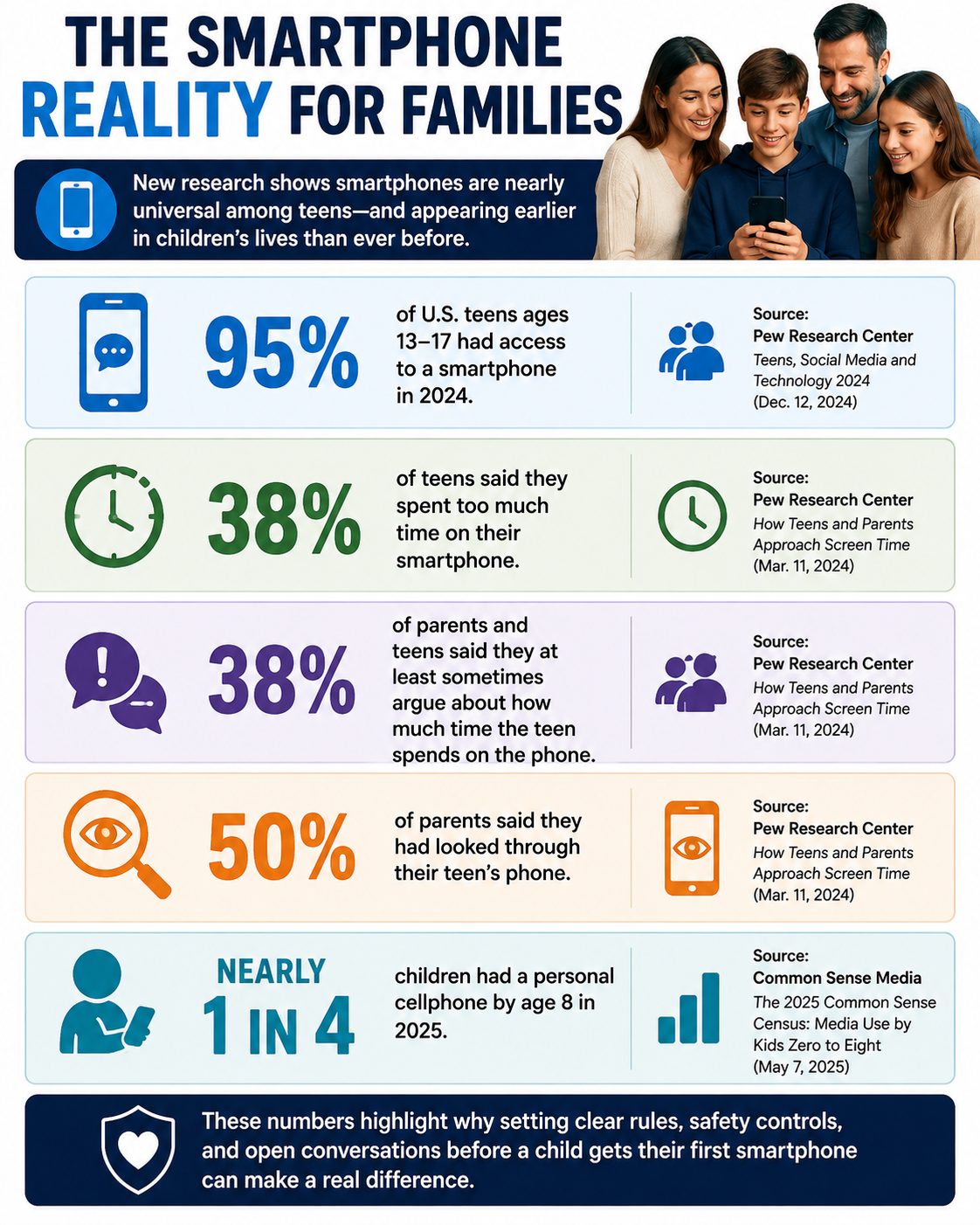
Smartphone Reality

The 10-Minute First Smartphone Setup

Before your child starts using the phone:

  1. Turn on parental controls.
  2. Require approval for app downloads and purchases.
  3. Review location-sharing settings.
  4. Check camera, microphone, photo and contact permissions.
  5. Configure web/content restrictions appropriate for the child.
  6. Set screen-time or downtime schedules.
  7. Turn off unnecessary notifications and autoplay.
  8. Establish the overnight charging location.
  9. Add important family/emergency contacts.
  10. Review the family’s “show me, don’t hide it” rule.

The FTC specifically encourages parents to decide what children may do with the phone, who may contact them, what apps they can download and what parental-control features are appropriate.

A First Smartphone Should Come With Training Wheels

A child’s first smartphone does not have to arrive with unrestricted access to every feature the device offers. Parents can begin with communication and essential apps, add privileges gradually, and adjust controls as a child demonstrates responsibility. It’s a good idea to treat a first phone somewhat like an experiment, with independence increasing as children show they’re ready for it. The most important preparation may not be a particular parental-control setting at all, but establishing a relationship in which children know they can ask for help when something online goes wrong. The goal isn’t to control every tap forever; it’s to help a child eventually use the technology safely without needing you to do it for them.

How old was your child when they got their first phone, and what’s the one rule you wish you’d established from day one?

What to Read Next

Why Some Parents Are Delaying Smartphones Longer Than Ever

Should Your Child Really Have a Smartphone Before School Starts?

Phone-Free Schools Act: New Policies Limit Student Smartphone Use to Curb Distraction and Cyberbullying

Evan Morgan

Evan Morgan has been a full-time freelance writer and editor for 10+ years. When not working, he enjoys catching the latest true crime documentary or getting lost in a good book.


Filed Under: Parenting Tagged With: child safety, children and technology, digital parenting, first smartphone, Internet Safety, Online Safety, parental controls, Parenting, Screen Time, smartphones

Why Summer Break Is Prime Time for Online Predators

June 10, 2026 | Leave a Comment

Hooded Hacker
A child using a tablet during summer break highlights the increased online activity that can create opportunities for online predators. Experts recommend open communication and digital safety rules to help reduce risks. (Pexels).

Summer break is a season many children look forward to, filled with freedom, vacations, and long days away from school. However, it also creates conditions that can increase online risks for kids and teens. With more free time and less structured supervision, young people often spend significantly more hours on social media, gaming platforms, and messaging apps. Child safety experts consistently warn that online predator activity tends to increase during summer months when children are more active online. Understanding why this happens can help parents and caregivers take proactive steps to protect their families.

More Screen Time Creates More Opportunities

When school is out, many children spend additional hours online connecting with friends, watching videos, and playing games. The increase in screen time naturally creates more opportunities for contact with strangers who may have harmful intentions. Experts note that predators often seek out platforms popular with children, including gaming communities, social media apps, and chat services. Summer schedules are often less structured, making it easier for young users to engage in lengthy online conversations without realizing potential risks. The simple reality is that more online activity means more chances for unwanted interactions to occur.

Predators Often Use Trust-Building Tactics

Online predators rarely reveal their true intentions immediately. Instead, they frequently spend days, weeks, or even months building trust with a child through friendly conversations and shared interests. A predator may pretend to be another teenager, compliment a child’s gaming skills, or offer emotional support during difficult moments. Research from child safety organizations has found that many young people have encountered individuals online who attempted to manipulate or befriend them for inappropriate purposes. These tactics can be especially effective during summer break when children may feel bored, lonely, or eager for new social connections.

Gaming Platforms and Social Apps Remain Key Targets

Many parents focus primarily on social media risks, but online gaming platforms can present similar concerns. Multiplayer games often include chat features, voice communication, and private messaging systems that allow strangers to connect with young players. A child who starts talking to someone during a game may eventually be encouraged to move conversations to other apps where monitoring is more difficult. Recent law enforcement investigations continue to uncover cases involving predators using popular gaming platforms to contact minors. While most interactions online are harmless, parents should understand that predators often go where children spend their time.

Warning Signs Families Should Never Ignore

One of the biggest misconceptions is that a child will always tell a parent if something feels wrong online. In reality, many young people stay silent because they feel embarrassed, confused, or afraid of losing device privileges. Warning signs may include secretive online behavior, sudden emotional changes, receiving gifts from unknown individuals, or becoming overly protective of devices. Parents should also pay attention if a child starts communicating with someone they have never met in person. Open communication remains one of the most effective tools for identifying potential concerns before they escalate.

Practical Steps to Reduce Summer Risks

Protecting children online does not require eliminating technology from their lives. Instead, experts recommend creating clear digital safety rules that are easy for children to understand and follow. Keeping devices in common family areas, reviewing privacy settings, discussing online grooming tactics, and encouraging children to report uncomfortable interactions can make a significant difference. Families should also regularly talk about the difference between online friends and trusted real-world relationships. These conversations help children recognize warning signs and feel comfortable seeking help when needed.

The Summer Safety Lesson Every Parent Should Remember

Summer break should be a time for fun, learning, and creating positive memories, not a season filled with hidden online dangers. While online predators remain a real threat, awareness and preparation can dramatically reduce a child’s risk of becoming a target. Parents who stay engaged in their children’s digital lives are better positioned to identify concerns and guide safe online behavior. The goal is not fear but informed vigilance that empowers both parents and children. As online activity continues to grow each summer, taking proactive steps today can help keep young people safer tomorrow.

What steps do you take to keep your children safe online during summer break? Have you had conversations with your kids about online predators and digital safety? Share your thoughts, experiences, and advice in the comments below to help other families stay informed and protected.

What to Read Next

Online Safety Experts Urge Parents to Check These Apps Before Summer Begins

The Toxic Household List: 5 Everyday Items Pediatricians Are Flagging for Toddler Safety

7 Warning Signs Your Child Is Spending Too Much Time Online This Summer

Evan Morgan

Evan Morgan has been a full-time freelance writer and editor for 10+ years. When not working, he enjoys catching the latest true crime documentary or getting lost in a good book.

Filed Under: Parenting Tagged With: child online safety, digital parenting, family safety, gaming safety, Internet Safety, online grooming, online predators, parenting tips, social media safety, summer break safety

Stop Posting Your Kids Online: The 2026 Safety Warning Every Parent Needs to Hear

April 1, 2026 | Leave a Comment

stop posting your kids online
Image source: shutterstock.com

Your social media feed probably looks like a digital scrapbook of your child’s most private moments. Every milestone and messy face is broadcast to a network of followers you barely know. It is easy to feel like this is a normal part of modern parenting. However, the system behind these platforms is designed to exploit your family’s data for profit and surveillance. You are not just sharing a photo; you are creating a permanent digital footprint without your child’s consent. You must stop posting your kids online to protect their future autonomy and physical safety in an increasingly digital world.

The Erosion of Digital Privacy

Tech giants rely on the constant stream of personal content to build sophisticated consumer profiles. When you upload a video, facial recognition software catalogs your child’s features instantly. This data persists long after you delete the original post or deactivate your account. Consequently, your child enters adulthood with a pre-defined identity shaped by algorithms. Surprisingly, even private accounts offer little protection against data scraping tools used by third-party brokers. On the other hand, a total blackout of personal imagery ensures that your child owns their own likeness.

The Rise of AI Exploitation

Artificial intelligence has fundamentally changed the risks associated with public imagery. Sophisticated bad actors now use simple family photos to create deepfake content or voice clones. By providing high-quality source material, you inadvertently assist those who wish to harm or impersonate your family. These tools require very little data to generate convincing and dangerous fabrications. Furthermore, the speed of AI development outpaces current legal protections for minors. Protecting your children now requires a proactive stance against any public data entry.

The Long-Term Consent Crisis

Children deserve the right to decide how they are presented to the world. Posting their tantrums or bathing photos takes away a choice they cannot yet understand. Many teenagers now report feeling betrayed by the extensive digital archives their parents created. This breach of trust can damage the parent-child relationship during the most sensitive developmental years. Therefore, prioritizing your child’s future comfort over your current social validation is an act of deep respect. Establishing boundaries today prevents a lifetime of digital regret for the next generation.

Reclaiming the Private Moment

Meaningful memories do not require a like count to be valid or important. Shifting back to physical photo albums and private messaging groups restores the sanctity of family life. You can still share updates with close relatives without exposing your life to the global internet. This transition reduces the pressure to perform for a digital audience during every family outing. Kids benefit from seeing their parents present and engaged rather than looking through a camera lens. Explore digital rights and read about privacy laws to understand the landscape of online protection.

How will you change your sharing habits to better protect your child’s digital future? Please think about your current posting frequency and leave a comment with your thoughts.

What to Read Next…

  • Why Schools Are Quietly Replacing Librarians with ‘Digital Media Specialists’
  • 6 Things That Can Happen When Parents Overshare About Their Kids Online
  • Think Before You Post: 7 Types of Photos You Should Never Post of Your Kids Online
Latrice Perez

Latrice is a dedicated professional with a rich background in social work, complemented by an Associate Degree in the field. Her journey has been uniquely shaped by the rewarding experience of being a stay-at-home mom to her two children, aged 13 and 5. This role has not only been a testament to her commitment to family but has also provided her with invaluable life lessons and insights.  As a mother, Latrice has embraced the opportunity to educate her children on essential life skills, with a special focus on financial literacy.

Filed Under: Safety Tagged With: AI risks, child safety, data privacy, digital privacy, Internet Safety, sharenting, stop posting your kids online

7 Kids’ Apps That Can Silently Access Your Camera or Microphone

October 21, 2025 | Leave a Comment

7 Kids' Apps That Can Silently Access Your Camera or Microphone
Image source: shutterstock.com

Most parents assume that popular children’s apps are harmless fun, but many have permissions that go far beyond games and learning tools. Hidden within terms and settings, some apps request—or even automatically gain—access to your child’s camera or microphone without clearly explaining why. These permissions can open the door to privacy risks, data collection, and even third-party tracking. Knowing which apps to watch out for and how to protect your child’s digital privacy has become essential in a world where playtime and technology are deeply intertwined.

1. TikTok

Though technically restricted to older users, TikTok remains one of the most downloaded apps among kids. Privacy experts have repeatedly raised concerns about how it accesses device cameras and microphones, even when the app isn’t actively recording. The platform’s algorithm thrives on user engagement, meaning it often gathers data on sounds, visuals, and facial expressions. While TikTok claims these features help personalize content, the data collection practices make it one of the top kids’ apps that can silently access your camera or microphone. Parents are encouraged to use “Family Pairing” mode to limit permissions and visibility.

2. Roblox

Roblox is a massive online gaming platform popular among children, but its permissions extend beyond gameplay. Some experiences within Roblox prompt camera and microphone use for voice chat or avatar interaction. However, once enabled, these permissions can remain active across sessions. This has led cybersecurity experts to include Roblox on lists of kids’ apps that can silently access your camera or microphone, especially when settings are not closely monitored. Parents can mitigate risks by disabling voice chat and reviewing privacy controls regularly.

3. Snapchat

Snapchat markets itself as a fun, creative messaging tool, but it requires near-constant access to a user’s camera and microphone. Even when a child isn’t actively taking pictures, the app may retain background permissions that allow ongoing data collection. The “Snap Map” feature also tracks location, further amplifying privacy concerns. For parents worried about kids’ apps that can silently access your camera or microphone, Snapchat poses multiple risks. Turning off location sharing and limiting friend lists can help reduce potential exposure.

4. YouTube Kids

YouTube Kids was designed to create a safe video experience, yet it’s not immune to privacy criticism. The app’s voice search feature requires microphone access, and in some cases, that access remains enabled even after closing the app. Critics argue that this could expose children to unnecessary data collection or unintentional listening. Though Google states that permissions are used strictly for functionality, YouTube Kids still appears on several cybersecurity lists of kids’ apps that can silently access your camera or microphone. Parents can adjust app permissions in device settings to improve security.

5. Zoom

Zoom became a staple of remote learning, but it also introduced new privacy risks. The app automatically requests access to the camera and microphone and may continue using them in the background during active sessions. For children attending virtual classes or social hangouts, this could mean unintended recording or observation. Security researchers have flagged Zoom as one of the kids’ apps that can silently access your camera or microphone when settings aren’t properly configured. Parents should always monitor when Zoom is active and ensure permissions are turned off once sessions end.

6. Facebook Messenger Kids

Messenger Kids was created to let children communicate under parental supervision, but the app still has broad access to cameras and microphones. Because it’s tied to Meta’s data ecosystem, the app may collect voice and video data to enhance filters or “safety” features. Unfortunately, that same access can leave open windows for potential misuse or data mining. Privacy advocates have cited it among the kids’ apps that can silently access your camera or microphone, especially if parents don’t frequently review permissions. Turning off certain features can help maintain tighter control.

7. Talking Tom and Friends

Talking Tom may seem like harmless entertainment, but the app has long faced controversy over how it records and stores audio. The app requires microphone access to mimic speech, but past security reviews revealed that data storage wasn’t always clearly managed or protected. Some versions also asked for camera access, raising eyebrows among privacy advocates. Because of these issues, Talking Tom and similar games are often mentioned in reports about kids’ apps that can silently access your camera or microphone. Experts recommend disabling microphone access entirely for nonessential entertainment apps.

Protecting Your Child’s Digital Privacy Starts with Awareness

Understanding how kids’ apps that can silently access your camera or microphone operate is the first step toward protecting your family’s privacy. Parents should regularly check app permissions, disable unnecessary features, and discuss with children why privacy matters. Tools like parental controls and privacy dashboards make it easier than ever to monitor access. Most importantly, choosing apps that clearly disclose how data is collected builds better digital habits from a young age. Vigilance today can prevent privacy problems tomorrow—and give parents peace of mind in an increasingly connected world.

Have you ever checked which apps have access to your child’s camera or microphone? What steps do you take to protect their privacy online? Share your thoughts in the comments.

What to Read Next…

6 Popular Family Apps That Have Leaked Children’s Data

The Truth About Screens: 9 Apps Your Kids Use That Secretly Collect Data

Government Spies: 8 Privacy Concerns with Government Databases of Kids

Data Harvested: 7 Ways Your Child’s Data Is Collected

Data Risk: 9 Data Breaches Still Threatening Your Kids’ Info

Catherine Reed
Catherine Reed

Catherine is a tech-savvy writer who has focused on the personal finance space for more than eight years. She has a Bachelor’s in Information Technology and enjoys showcasing how tech can simplify everyday personal finance tasks like budgeting, spending tracking, and planning for the future. Additionally, she’s explored the ins and outs of the world of side hustles and loves to share what she’s learned along the way. When she’s not working, you can find her relaxing at home in the Pacific Northwest with her two cats or enjoying a cup of coffee at her neighborhood cafe.

Filed Under: Technology Tagged With: app permissions, child safety, cybersecurity, digital parenting, family technology, Internet Safety, kids apps, online privacy, Parenting

6 Parenting Tech Shortcuts That Can Expose Your Child to Strangers

August 30, 2025 | Leave a Comment

6 Parenting Tech Shortcuts That Can Expose Your Child to Strangers
Image source: 123rf.com

Technology has made parenting more convenient, but those same tools can create new risks that parents often overlook. While apps, devices, and online platforms promise safety and efficiency, they can also open the door to strangers if not used carefully. Many families rely on parenting tech shortcuts to save time, yet these shortcuts can compromise privacy and security. Being aware of the hidden dangers behind these tools is the first step toward protecting your child.

1. Location-Sharing Apps That Overshare

Parents often use apps that allow kids to share their location, believing this keeps them safe. The problem is that some apps make tracking information accessible to more than just parents. Strangers can exploit weak privacy settings and gain access to real-time data about where your child is. Even if the app seems trustworthy, third-party data sharing can expand the risk. Reviewing permissions and limiting who has access is crucial when relying on these parenting tech shortcuts.

2. Smart Speakers Listening In

Many households use smart speakers for homework help, music, or entertainment. However, these devices often record conversations and store them in the cloud. If accounts are not properly secured, strangers or hackers could access sensitive information. Children may unknowingly share details about their school, friends, or routines while chatting with the device. Parents should always check privacy settings and avoid linking personal accounts too freely to these parenting tech shortcuts.

3. Kid-Friendly Tablets with Weak Security

Tablets designed for children often come preloaded with apps and games. While they appear harmless, some apps collect data without clear consent. Free games in particular may expose kids to strangers through chat features or hidden advertising networks. The default settings on these devices rarely prioritize security. Parents should adjust restrictions before handing tablets over, because these parenting tech shortcuts can create digital entry points for outsiders.

4. Social Media Profiles for Young Kids

Some parents create social media accounts for their children to share milestones with friends and family. Unfortunately, these profiles can be discovered by strangers if privacy settings are left unchecked. Photos, names, and even location tags can provide more personal information than parents realize. Once shared, images and posts can be copied or misused without consent. Using these parenting tech shortcuts to simplify sharing may inadvertently expose a child’s personal life to the public.

5. Homework Help Apps That Collect Data

Digital homework helpers seem like a dream come true for busy families. Yet many require account creation, data entry, or even access to a child’s camera and microphone. This data may be sold to advertisers or left vulnerable to breaches. Some apps also allow peer-to-peer interactions that aren’t always closely monitored. Parents should carefully vet any platform, because these parenting tech shortcuts often prioritize convenience over safety.

6. Video Calling Tools Without Supervision

Video chats help kids stay in touch with family and friends, but unsupervised use can lead to risky connections. Many platforms allow users to be contacted by strangers if privacy settings aren’t configured properly. Kids may accidentally accept calls or messages from people they don’t know. Even well-meaning relatives can leave devices unlocked, giving others an opening. Parents should supervise video calls and use parental controls to minimize the risks tied to these parenting tech shortcuts.

Awareness Protects What Shortcuts Can’t

Convenience is tempting, and parenting tech shortcuts can save valuable time. Yet shortcuts should never come at the cost of safety. By paying attention to privacy settings, monitoring device use, and asking tough questions about data collection, parents can stay one step ahead. Technology itself isn’t the enemy, but careless use can expose kids to strangers. Staying vigilant ensures children enjoy the benefits of tech without being put at unnecessary risk.

What parenting tech shortcuts do you rely on, and how do you make sure they stay safe for your child? Share your thoughts in the comments below.

What to Read Next…

How Much Screen Time Is Quietly Reshaping Childhood Behavior?

The Dark Side of Kids’ YouTube You Didn’t See Coming

Are We Giving Our Kids Too Much Freedom Too Soon? Here’s Why You Might Be Wrong

10 Ways Parents Are Accidentally Teaching Entitlement

5 Unintended Consequences Of Keeping A Child Sheltered

Catherine Reed
Catherine Reed

Catherine is a tech-savvy writer who has focused on the personal finance space for more than eight years. She has a Bachelor’s in Information Technology and enjoys showcasing how tech can simplify everyday personal finance tasks like budgeting, spending tracking, and planning for the future. Additionally, she’s explored the ins and outs of the world of side hustles and loves to share what she’s learned along the way. When she’s not working, you can find her relaxing at home in the Pacific Northwest with her two cats or enjoying a cup of coffee at her neighborhood cafe.

Filed Under: Technology Tagged With: child safety, digital parenting, Internet Safety, kids and technology, online privacy, parental controls, parenting tech shortcuts

The Digital Footprint: 12 Steps To Secure Your Child’s Digital Footprint For Life

July 28, 2025 | Leave a Comment

The Digital Footprint 12 Steps To Secure Your Childs Digital Footprint For Life
Image source: 123rf.com

Your child’s first steps might be adorable, but their digital steps could be permanent. From social media posts to school login portals and smart toys, kids are creating digital trails long before they understand the impact. These digital footprints can follow them into adulthood, affecting everything from college admissions to career opportunities. That’s why taking action early to secure your child’s digital footprint isn’t just smart—it’s essential. With a few thoughtful moves, you can help your child grow up digitally safe, protected, and in control of their online identity.

1. Limit Oversharing from Day One

Posting that ultrasound photo or first day of school pic may seem harmless, but every public image adds to your child’s online record. Consider using private accounts or close friends lists for sharing updates. Always skip names, birthdates, and location tags when posting. The fewer digital breadcrumbs, the better. Oversharing is one of the first habits to shift if you want to secure your child’s digital footprint.

2. Turn Off Location Services on Devices

Most apps come with built-in location tracking that broadcasts where your child is when they’re online. Turn off location permissions in device settings for social media, games, and camera apps. It only takes a few seconds to adjust, but it makes a huge impact on safety. Teach your child to check location settings too so they stay aware. This step keeps real-world privacy secure.

3. Set Up Strong, Unique Passwords

Kids often use easy-to-guess passwords like their pet’s name or favorite number, and that puts everything at risk. Help them create strong, unique passwords for school logins, gaming accounts, and email. Consider using a password manager to store them securely. Change passwords regularly and never reuse them across platforms. This habit will protect their digital identity for years to come.

4. Teach Them About Phishing and Scams

Even tech-savvy teens can fall for a fake email or sketchy link. Talk to your child about what phishing looks like—unexpected links, suspicious emails, or DMs asking for passwords. Make sure they know to never share private info without checking with you first. Run through a few examples together so they’re equipped to spot red flags. Awareness is one of the best tools to secure your child’s digital footprint.

5. Monitor Social Media Use Without Micromanaging

You don’t have to snoop, but you should know where your child is active online. Sit down regularly to review privacy settings on Instagram, TikTok, Snapchat, and any other apps they use. Encourage them to only connect with people they know in real life. Talk about the long-term impact of posts and how content can be screenshotted and shared. Mutual trust helps kids feel supported while learning to make smart online choices.

6. Limit the Use of Full Names and Birthdates

Many games, sites, and apps ask for a full name or birthday—but this info is often used for advertising or sold to third parties. Instead, use initials, nicknames, or alternate usernames. You can also fudge the birth year slightly on non-essential sites to avoid targeted tracking. Avoiding real details is a quick way to reduce digital exposure.

7. Use Parental Controls and Privacy Tools

Parental controls aren’t about spying—they’re about protecting. Use built-in tools on your child’s devices to block inappropriate content, limit downloads, and prevent sharing of personal data. These settings can filter search results, limit screen time, and help prevent digital oversharing. Regularly review and adjust as your child grows. These tools are vital to secure your child’s digital footprint during their early years online.

8. Avoid Linking Accounts Together

When apps ask if they can link to Facebook, Google, or another platform, it may seem convenient—but it creates a sprawling web of shared data. Encourage your child to sign up with email instead, using a clean account with minimal exposure. The fewer connections across platforms, the easier it is to manage and protect. Keeping accounts separate adds another layer of digital safety.

9. Encourage Digital Clean-Up Days

Make it a habit to sit down once a month and review your child’s accounts. Remove old photos, update privacy settings, and delete unused apps. This builds awareness and gives your child more control over what’s out there. Think of it like digital spring cleaning—it’s refreshing and necessary. Regular cleanups help secure your child’s digital footprint before it gets too messy to manage.

10. Don’t Share School Info Publicly

It’s tempting to post about a new school year, report cards, or class awards—but these posts often reveal more than you realize. School logos, teacher names, and classroom numbers all tell strangers where your child spends their day. Keep school content private or off social media entirely. This step guards both your child’s safety and their data.

11. Talk About Future Impacts of Online Behavior

Even young kids need to know that what they post today can affect tomorrow. Whether it’s a silly TikTok or an angry comment, teach them that digital actions leave a trail. Use age-appropriate stories to explain how posts can influence college applications or job opportunities. Encouraging smart choices now sets the tone for a lifetime of digital responsibility.

12. Model Good Digital Habits Yourself

Kids watch how you behave online. If you overshare, ignore privacy settings, or scroll nonstop, they’ll see that as the norm. Let them see you update passwords, check privacy settings, or pause before posting. When you model mindful tech use, your child learns that digital safety isn’t just a rule—it’s a lifestyle. This is one of the most powerful ways to secure your child’s digital footprint without saying a word.

Their Future Starts with What You Post Today

Digital footprints are invisible until they’re not—when an embarrassing photo resurfaces or personal data is misused. But with a little intention and a lot of awareness, you can help secure your child’s digital footprint before it becomes a problem. These steps aren’t about fear or control—they’re about protecting your child’s future in a world where digital identity matters more every day. Give them the gift of privacy, safety, and confidence online. Their future self will thank you.

What steps have you taken to secure your child’s digital footprint? Any tips or questions you’d add? Let us know in the comments!

Read More:

Digital Safety: 6 Steps to Safeguard Your Child’s Online Identity

9 Privacy Settings You Didn’t Know Existed for Kids’ Devices

Catherine Reed
Catherine Reed

Catherine is a tech-savvy writer who has focused on the personal finance space for more than eight years. She has a Bachelor’s in Information Technology and enjoys showcasing how tech can simplify everyday personal finance tasks like budgeting, spending tracking, and planning for the future. Additionally, she’s explored the ins and outs of the world of side hustles and loves to share what she’s learned along the way. When she’s not working, you can find her relaxing at home in the Pacific Northwest with her two cats or enjoying a cup of coffee at her neighborhood cafe.

Filed Under: Parenting Tagged With: child data protection, digital footprint tips, digital parenting, Internet Safety, kids and privacy, online safety for kids, secure your child's digital footprint

The Unseen Risk: 8 Smart Toys With Privacy Risks

July 28, 2025 | Leave a Comment

The Unseen Risk 8 Smart Toys With Privacy Risks
Image source: 123rf.com

They talk, they learn, they connect to the internet—and they’re in your child’s toy bin right now. Smart toys have become some of the most popular gifts for kids, promising entertainment, education, and even companionship. But behind the blinking lights and friendly voices lie serious concerns many parents don’t realize. Some smart toys collect data, record conversations, or connect to networks with weak security protections. If you’re not careful, you might be inviting more than fun into your home—so here are eight smart toys with privacy risks every parent should know about.

1. Smart Speakers with Voice Assistants

Devices like Amazon Echo Dot Kids and Google Nest Mini seem harmless and even helpful, but they’re always listening. Even when not actively being used, smart speakers often record snippets of background conversation that may include sensitive information. While companies claim this data improves their service, it can also be stored, analyzed, or shared. These smart toys with privacy risks can accidentally pick up voices of your child, guests, or other family members without consent. Always review privacy settings and disable unnecessary voice recording features.

2. Wi-Fi Connected Baby Monitors

Baby monitors have come a long way—but the newer ones with camera access, two-way talk, and smartphone apps can be vulnerable to hacking. Some have been reported to allow outsiders to view live feeds or speak to children through the monitor. If the monitor’s app or firmware isn’t regularly updated or password protected, it becomes an easy entry point for digital intruders. Many of these devices also collect data on sleep patterns and audio, storing it in the cloud. For privacy peace of mind, choose baby monitors with strong encryption and turn off cloud features when not needed.

3. Internet-Connected Dolls

Some dolls, like earlier versions of “My Friend Cayla,” connect to Bluetooth and use AI to have real conversations with kids. While engaging, these toys can also record what your child says and transmit that data to external servers. Security researchers have flagged multiple smart dolls with privacy risks for exposing personal information, including location data. In some cases, anyone within Bluetooth range can access the device without authorization. That’s a major concern for families who value security over novelty.

4. Educational Tablets and Apps

Devices like Leapfrog and VTech tablets are designed to teach kids math, reading, and more—but they also collect a surprising amount of user data. These tablets often store information such as name, age, usage history, and even keystrokes. Without strong password settings and careful monitoring of permissions, this data can be vulnerable to leaks or misuse. Additionally, some educational apps include ads or links that open browsers, exposing children to online tracking. These are among the more common smart toys with privacy risks found in homes and classrooms.

5. Smartwatches for Kids

Kids’ smartwatches with GPS tracking, calling, and texting functions sound like a great way to stay in touch. However, many of these devices have had serious security flaws—including the ability for strangers to track, listen to, or contact children. In several studies, researchers found that some models transmitted data without encryption or stored it on servers with poor protection. That means a seemingly helpful gadget could become a privacy nightmare. When buying a smartwatch, research the manufacturer’s reputation and look for devices with end-to-end encryption.

6. Interactive Plush Toys

Plush toys that respond to touch, talk back, or interact with mobile apps are often marketed as safe and cuddly companions. But many of these toys contain microphones and Bluetooth connections that can collect data or be remotely accessed. If the toy connects to a smartphone without a PIN or code, nearby devices can potentially pair with it without permission. In 2017, a data breach exposed the personal data of over 800,000 users from a popular smart plush toy app. That’s proof that even the softest toys can come with hard risks.

7. Augmented Reality (AR) Games and Headsets

AR games that use smartphone cameras to blend digital play with the real world are rising in popularity. But these games often collect images of your home, surroundings, and even faces. The concern is that this data can be stored or used for facial recognition training or location mapping. Some AR headsets or toys also include microphones and may not clearly disclose when they’re recording. These immersive experiences often come with hidden trade-offs, making them smart toys with privacy risks worth reviewing carefully.

8. Drone Toys with Cameras

Mini drones are popular among tweens and teens for their fun flying features and built-in cameras. But when connected to Wi-Fi or Bluetooth, they can collect video footage and transmit it through unsecured apps. Some models automatically upload footage to cloud servers, and others come with poorly protected companion apps. Kids might not realize they’re recording people or places without consent, raising privacy and legal concerns. Always monitor how these devices are used and ensure footage isn’t shared unintentionally.

Toy Time Shouldn’t Come with a Surveillance Side Effect

Smart toys bring joy, learning, and convenience—but they also open digital doors that many families didn’t know existed. As technology becomes more embedded in our children’s play, it’s essential to stay ahead of potential risks. The smart toys with privacy risks listed here aren’t meant to scare you away from innovation—they’re meant to help you ask the right questions. Is this device secure? What data does it collect? And who else can access it? The more you know, the better you can protect your child while still letting them enjoy the magic of play.

Have you come across a smart toy with unexpected privacy settings or risks? What steps do you take to keep your child’s data safe? Share in the comments below!

Read More:

Before You Buy: 10 Popular Kids’ Toys With Cancer-Causing Materials

8 Hidden Dangers Lurking in Your Child’s Toys

Catherine Reed
Catherine Reed

Catherine is a tech-savvy writer who has focused on the personal finance space for more than eight years. She has a Bachelor’s in Information Technology and enjoys showcasing how tech can simplify everyday personal finance tasks like budgeting, spending tracking, and planning for the future. Additionally, she’s explored the ins and outs of the world of side hustles and loves to share what she’s learned along the way. When she’s not working, you can find her relaxing at home in the Pacific Northwest with her two cats or enjoying a cup of coffee at her neighborhood cafe.

Filed Under: Parenting Tagged With: child privacy, data protection for families, Internet Safety, kids and technology, parenting tips, smart toys with privacy risks, tech toys, toy safety

The Hidden Message: 9 Online Threats That Use Deepfakes Of Kids

July 27, 2025 | Leave a Comment

The Hidden Message 9 Online Threats That Use Deepfakes Of Kids
Image source: 123rf.com

The internet has always had its dark corners, but deepfake technology has opened an alarming new chapter—especially when it comes to kids. What once seemed like science fiction is now disturbingly real: videos, images, and even voices of children can be manipulated with shocking accuracy. These online threats that use deepfakes of kids aren’t just creepy—they’re dangerous, deceptive, and growing more common. As parents, it’s crucial to understand how this technology is being misused and what you can do to protect your child. The sooner we spot the hidden message behind these threats, the better prepared we’ll be to fight them.

1. Cyberbullying Through Fake Content

Deepfakes are being used in cyberbullying by creating fake videos of kids saying or doing things they never actually did. These clips can be shared at school or online to humiliate, harass, or isolate a child. The targets often have no idea how their face or voice was used until the damage is done. Because deepfakes can look incredibly convincing, it’s hard for others to tell the video is fake—making the impact even more severe. Among all online threats that use deepfakes of kids, this one spreads the fastest and hits the hardest.

2. Exploitation and Grooming Setups

Predators have begun using deepfakes to create fake “peer” accounts with manipulated child images to lure real kids into online conversations. These accounts appear to be kids of a similar age but are actually run by adults using deepfake avatars to build trust. Once a connection is made, grooming tactics begin—often leading to requests for inappropriate content or in-person meetings. Parents may never suspect that the new “friend” their child is chatting with isn’t real. This is one of the most dangerous online threats that use deepfakes of kids because it hides predators behind innocent-looking digital masks.

3. Revenge Content or “Punishment” Videos

Sometimes, deepfakes are used by peers or even ex-friends to shame or threaten a child. Videos might show a child in embarrassing or compromising scenarios they never actually experienced. These can be sent privately to intimidate them or posted publicly to damage their reputation. The goal is to control, embarrass, or socially punish the child using fake content that looks all too real. It’s emotional blackmail disguised as entertainment.

4. Political or Ideological Manipulation

Believe it or not, some groups use deepfakes of kids to make bold political statements or spread propaganda. Videos may show children promoting harmful ideologies, reacting to staged events, or acting in ways that support controversial agendas. These fake videos can go viral and stir outrage, but the featured child often has no connection to the content at all. This misuse not only violates their rights but can also put them in danger from people who believe the fake narrative. It’s one of the more calculated online threats that use deepfakes of kids for manipulation.

5. Targeted Scams Using Child Avatars

Scammers are getting creative by using deepfake versions of children in video calls or messages to trick people into giving money or information. For example, someone might impersonate a child claiming to be in danger or in need of urgent help. The fake emotional plea tugs at heartstrings and prompts fast action before the truth is questioned. Because the face and voice seem real, the scam becomes incredibly convincing. These tactics turn innocent images into tools of exploitation.

6. Unauthorized Product Ads

Some deepfakes are created to insert a child’s likeness into product ads or promotional content without parental permission. Whether it’s a fake toy review or an ad showing the child using a product, these are often made to look like organic, user-generated content. This violates the child’s privacy and uses their image for profit without consent. Even worse, it teaches kids that their identity can be used and sold without their control. As one of the commercial online threats that use deepfakes of kids, this trend is growing quickly on social platforms.

7. Fake “Missing Child” Campaigns

In a disturbing twist, scammers are using deepfake videos or photos to create fake missing child posters or donation campaigns. These emotional pleas are designed to pull on people’s heartstrings and prompt donations to fraudulent causes. Sometimes, real children’s names and faces are used, pulled from public accounts or school websites. Other times, entirely fake personas are generated using deepfakes to appear more legitimate. This tactic not only scams people out of money but also undermines trust in real missing child alerts.

8. Manipulated Academic Content

Deepfakes are also being used to frame students for cheating or inappropriate behavior during virtual classes. A manipulated video might show a child with their eyes wandering during a test or saying something they didn’t. This can lead to disciplinary action before anyone realizes the footage isn’t real. The technology’s believability means students can be unfairly punished based on faked content. It’s a silent yet serious academic threat.

9. Emotional Manipulation in Digital Games or Stories

Some apps and games now use AI-generated children in emotionally charged stories that seem real. These digital characters may look like real kids and even use the names and faces of actual children scraped from social media. The goal is often to manipulate viewers emotionally—usually to push content, views, or downloads. It blurs the line between fiction and reality, sometimes pulling kids into creepy or unsettling experiences. This soft yet invasive form of manipulation is one of the lesser-known online threats that use deepfakes of kids to influence emotions.

Deepfakes May Be Digital, But the Damage Is Real

We can’t stop technology from evolving, but we can demand better protections and stay alert. The rise of online threats that use deepfakes of kids is a wake-up call for every parent, school, and platform. It starts with limiting what personal content is shared online and educating kids on the risks of digital manipulation. It also means pushing for better regulations and transparency from the platforms that allow these deepfakes to spread. Awareness isn’t optional—it’s essential.

Have you seen any deepfake content online involving children? What steps are you taking to protect your family? Share your thoughts in the comments below.

Read More:

6 Legal Protections for Your Child’s Digital Footprint

9 Privacy Settings You Didn’t Know Existed for Kids’ Devices

Catherine Reed
Catherine Reed

Catherine is a tech-savvy writer who has focused on the personal finance space for more than eight years. She has a Bachelor’s in Information Technology and enjoys showcasing how tech can simplify everyday personal finance tasks like budgeting, spending tracking, and planning for the future. Additionally, she’s explored the ins and outs of the world of side hustles and loves to share what she’s learned along the way. When she’s not working, you can find her relaxing at home in the Pacific Northwest with her two cats or enjoying a cup of coffee at her neighborhood cafe.

Filed Under: Parenting Tagged With: child exploitation, child privacy, deepfake dangers, deepfake technology, digital parenting, Internet Safety, online safety tips, online threats that use deepfakes of kids

Think Before You Post: 7 Types of Photos You Should Never Post of Your Kids Online

July 27, 2025 | Leave a Comment

Think Before You Post 7 Types of Photos You Should Never Post of Your Kids Online
Image source: 123rf.com

We live in a world where sharing cute photos of our kids is second nature—but just because we can share something doesn’t mean we always should. Some pictures may seem harmless or funny, but they can actually put your child’s privacy, safety, and future at risk. Whether it’s for likes, laughs, or memories, it’s worth thinking twice about what you upload. The internet is forever, and your child can’t undo what you’ve already shared. To help you protect them now and later, here are seven types of photos you should never post of your kids online.

1. Anything Involving Nudity or Partial Undress

Even innocent moments like bath time, potty training, or kids running around in diapers should stay offline. What’s funny to us might be embarrassing or inappropriate in the eyes of others—and unfortunately, there are people online who exploit these images. Once uploaded, these photos can be downloaded, altered, or shared without your knowledge. It also sets up a digital trail your child may not want when they’re older. If there’s one category of photos you should never post of your kids online, it’s anything that shows them undressed.

2. First Day of School With Personal Details

That adorable first-day-of-school photo may include more information than you realize. Backpacks, lunchboxes, or signs often reveal your child’s full name, school, teacher, or even grade level. Combined with geotags or location settings, strangers can easily figure out where your child will be on a daily basis. This can make your child a target for scams or worse. To stay safe, crop or blur out identifying details and turn off location tagging before sharing.

3. Medical Situations or Injuries

Photos of your child in a hospital bed or recovering from an injury may seem like an update for concerned friends, but they can quickly cross into oversharing. These moments are deeply personal and can affect how your child feels about themselves later on. It also exposes sensitive health information that your child may want to keep private. You might also unintentionally create long-term digital records about their health that could be misused. Respect their dignity and choose a private update instead of a public post.

4. Tantrums or Embarrassing Moments

It might feel relatable to share your toddler’s grocery store meltdown or a cringeworthy moment from your teen’s life, but it’s rarely worth the laughs. Kids deserve to be treated with the same respect we expect for ourselves. These types of photos can be humiliating and even contribute to bullying if they spread. What seems like harmless fun to you might deeply embarrass your child or damage their trust in you. This is one of the clearest examples of photos you should never post of your kids online.

5. Group Photos Without Parental Permission

It’s tempting to snap and share pictures of your child’s soccer team, birthday party, or school play—but have you considered the privacy of the other children in the photo? Not all parents are comfortable with their child’s image being shared online, especially if there are custody or safety concerns involved. Always ask for permission before posting pictures of other children. Better yet, share group photos in private family albums or messaging apps instead of on public platforms. Being respectful of others’ boundaries helps build a more mindful online culture.

6. Pictures With Location Clues

Even if you’re not tagging a location, background details in a photo can reveal a lot. Street signs, house numbers, school names, or recognizable landmarks can all give away your child’s whereabouts. This can unintentionally expose them to risk, especially if the photo includes a regular routine like walking to school or playing in the yard. Always scan your background for identifying features before sharing. The more you limit location clues, the harder it is for someone to misuse your content.

7. Milestones That Aren’t Theirs to Share Yet

Some life moments—like losing a first tooth, starting puberty, or wearing their first bra—are milestones your child may prefer to keep private. These moments are special, but they’re also deeply personal. Posting about them may make your child feel embarrassed, especially if classmates or extended family see the post without their consent. Children deserve the chance to control their own stories as they grow. If you’re unsure, ask your child how they feel about sharing the moment first.

Online Posts Last Longer Than Childhood

The digital world moves fast, but posts last forever—even when you think they’re gone. The photos you should never post of your kids online aren’t just about safety today; they also impact their privacy, self-image, and digital reputation in the future. It’s not about guilt or fear—it’s about mindful sharing. Before you hit “post,” ask yourself if your child would want this photo online ten years from now. Protecting their future starts with thoughtful choices in the present.

Have you ever regretted posting a photo of your child online? What’s your personal rule for sharing? Let’s talk about it in the comments!

Read More:

Privacy Violation: 7 Things Never to Post About Your Kids Online

12 Steps to Secure Your Child’s Digital Footprint for Life

Catherine Reed
Catherine Reed

Catherine is a tech-savvy writer who has focused on the personal finance space for more than eight years. She has a Bachelor’s in Information Technology and enjoys showcasing how tech can simplify everyday personal finance tasks like budgeting, spending tracking, and planning for the future. Additionally, she’s explored the ins and outs of the world of side hustles and loves to share what she’s learned along the way. When she’s not working, you can find her relaxing at home in the Pacific Northwest with her two cats or enjoying a cup of coffee at her neighborhood cafe.

Filed Under: Parenting Tagged With: child privacy, digital safety, Internet Safety, online sharing, parenting tips, photos you should never post of your kids online, protecting kids online, social media parenting

Don’t Fall For This: 7 Social Media Challenges Kids Are Doing That Are Scams

July 26, 2025 | Leave a Comment

Dont Fall For This 7 Social Media Challenges Kids Are Doing That Are Scams
Image source: 123rf.com

What looks like innocent fun or viral entertainment could actually be tricking your child out of money, data, or even their personal safety. Many of the social media challenges kids are doing aren’t just silly dares anymore—they’re cleverly disguised scams. These trends often come with promises of prizes, fame, or approval, but the risks are real and far-reaching. As parents, it’s crucial to understand how these schemes are working and how to talk with kids about spotting red flags online. Let’s break down seven social media challenges kids are doing that are actually scams in disguise.

1. “Share This and Win” Giveaways

These challenges usually involve a post claiming you’ll win a free iPhone, cash prize, or gaming console just for liking, sharing, or tagging friends. The catch? There’s never a real prize. Instead, scammers use these to harvest usernames, collect data, or gain visibility for fake accounts. Kids may think it’s harmless participation, but they’re unknowingly promoting fraudulent pages. These fake giveaways are among the most widespread social media challenges kids are doing that lead straight into phishing or identity theft traps.

2. The “Send Money to Get More Back” Trend

This one preys on older kids and teens with access to payment apps like Cash App or Venmo. They’re told if they send a small amount of money, they’ll receive double or triple in return as part of a “blessing circle” or “flip challenge.” It’s a scam every time. Once the money is sent, the scammer disappears. This is one of the riskiest social media challenges kids are facing because it directly involves real financial loss and potential fraud.

3. “Reveal a Secret for a Prize” Dares

In these challenges, kids are encouraged to post a personal secret, embarrassing photo, or private message in exchange for a prize or social clout. What they don’t realize is that their content can be screenshotted, shared without consent, or used for blackmail. Predators and trolls look for this type of content to exploit. It’s one of the most dangerous social media challenges kids are facing because it creates lasting consequences from one impulsive post.

4. QR Code Challenges

This one might seem techy and harmless, but QR code scams are on the rise. Kids are asked to scan mystery QR codes as part of a “challenge” to see where it leads, often promoted as a fun surprise or joke. But those codes can lead to malicious websites that install spyware, viruses, or steal login info. It’s one of the newer, more discreet social media challenges kids are doing that puts their digital safety at risk. Always remind your child to only scan codes from trusted sources.

5. “Clickbait” Video Challenges

Challenges that require clicking a suspicious link to “see what happens next” are rarely safe. These often redirect to fake sites that mimic popular platforms and request login credentials. Once entered, hackers gain access to social media accounts, emails, or more. Kids may not realize how easily their info can be stolen this way. These kinds of clickbait setups are another example of the scammy social media challenges kids are doing, sometimes without even knowing it.

6. Fake Charity Donation Chains

Many well-meaning kids join donation-based “challenges” where they’re told to raise money for causes by forwarding links, donating small amounts, or sharing Venmo/Cash App handles. While some are legit, many are not. Scammers pose as organizations and use emotional bait to get kids to spread their scheme. Teach your child to verify all donation links and to ask for adult help before contributing. These scams rely heavily on peer pressure and goodwill, making them especially tricky.

7. App Download and Review Challenges

This challenge involves being promised in-game rewards, cash, or access to special content in exchange for downloading and reviewing a certain app. Often, the app is disguised as adware or collects more data than it should. Once downloaded, it can flood devices with pop-ups or worse—spy on usage habits. These are among the stealthier social media challenges that kids are engaging in that monetize their actions without their consent. Encourage your kids to always ask before installing new apps.

Keep the Conversation Open and Real

You don’t have to ban your child from social media to keep them safe. What really makes the difference is an ongoing, judgment-free conversation about how these scams work. When kids feel safe asking questions, they’re more likely to tell you when something seems off. Many of the social media challenges kids are facing start with curiosity or peer pressure, but they can quickly spiral into risk. Equip your child with the knowledge to spot what’s real and what’s a setup, and they’ll be far better prepared to navigate online spaces confidently.

Have you come across any unusual or suspicious online trends that tempted your kids? Share your experience in the comments—we’d love to hear from you.

Read More:

Privacy Violation: 7 Things Never to Post About Your Kids Online

12 Steps to Secure Your Child’s Digital Footprint for Life

Catherine Reed
Catherine Reed

Catherine is a tech-savvy writer who has focused on the personal finance space for more than eight years. She has a Bachelor’s in Information Technology and enjoys showcasing how tech can simplify everyday personal finance tasks like budgeting, spending tracking, and planning for the future. Additionally, she’s explored the ins and outs of the world of side hustles and loves to share what she’s learned along the way. When she’s not working, you can find her relaxing at home in the Pacific Northwest with her two cats or enjoying a cup of coffee at her neighborhood cafe.

Filed Under: Parenting Tagged With: digital parenting, family tech safety, Internet Safety, kids online, Online Safety, parenting tips, social media challenges kids are doing, social media scams, teen trends

Your Baby’s Identity: How 7 Online Actions Are Secretly Putting Them At Risk

July 22, 2025 | Leave a Comment

Your Babys Identity How 7 Online Actions Are Secretly Putting Them At Risk
Image source: 123rf.com

From birth announcements to cute milestones, many parents are eager to share their baby’s journey online. But what starts as a harmless post can quietly open the door to long-term risks. Hackers and scammers aren’t just after adult information anymore—your baby’s identity is increasingly becoming a target for fraud, and most parents don’t realize how easy it is to expose personal data. A single post can contain everything needed to start building a fake profile in your child’s name. Here are seven common online habits that could be putting your baby’s future privacy at serious risk.

1. Sharing Full Birth Announcements on Social Media

Announcing your baby’s birth online is a joyful moment, but including too many details can be dangerous. Posts that include your baby’s full name, date of birth, and hospital location give identity thieves a head start. These key pieces of personal information are often enough to begin creating fake documents or apply for benefits. Since your baby won’t use their credit or identity for years, the fraud can go undetected until much later. Keeping your announcement short and sweet—without full names or birthdates—helps protect your baby’s identity.

2. Posting Photos with Personal Info in the Background

You may think twice before sharing a close-up of your baby’s birth certificate, but what about that photo of them lying on a hospital bed with a bracelet showing? Or a snapshot of a birthday party with a banner that includes their full name and age? These background details often go unnoticed by parents but are gold mines for scammers. This is one of the easiest ways your baby’s identity becomes vulnerable through everyday images. Before sharing, always scan your photos for visible names, addresses, or identifying numbers.

3. Using Location Tags or Check-Ins

Tagging your location when you’re out with your baby might seem fun or harmless, but it can lead to unintended tracking. When you tag your home, favorite park, daycare, or pediatrician’s office, you’re quietly building a digital map of your child’s life. This information can be scraped and stored, even if you delete it later. Over time, it becomes easier for someone to gather context about your child’s routines or physical whereabouts. To help shield your baby’s identity and safety, turn off location sharing on social platforms.

4. Entering Baby Photo Contests or Giveaways Without Checking Privacy Terms

Online baby photo contests or free baby gear giveaways can be tempting—but they often come with hidden data collection. You might be required to submit your child’s name, birthday, and photos, which can be stored, shared, or even sold to third-party marketers. Many of these platforms lack strong privacy protection, putting your baby’s identity at risk of exposure or misuse. Always read the terms and conditions and avoid contests that don’t clearly state how your data will be used. When in doubt, skip the entry.

5. Using Weak Passwords on Baby Monitoring Apps

Baby monitors, sleep tracking apps, and parenting platforms often require accounts that store sensitive data like names, birthdates, and photos. If you’re using the same password across apps or haven’t changed it since setup, you’re creating an easy entry point for hackers. Breaches of parenting platforms have occurred in the past, exposing data about young children and their families. This is another way your baby’s identity could end up in the wrong hands without you realizing it. Use strong, unique passwords and enable two-factor authentication whenever possible.

6. Publicly Sharing Milestone Cards or First Day of School Signs

First smiles, first steps, and first days of preschool are all worth celebrating—but be careful about what’s visible in milestone posts. Many parents love to share photos with signs showing the child’s name, age, birthday, favorite things, or school name. These details seem adorable but can help build a detailed profile of your baby’s identity over time. That information can be gathered by bots or data scrapers and used in phishing schemes or fraud. Keep milestone updates fun by limiting details and sharing them privately with trusted circles.

7. Forgetting to Review Privacy Settings

You may assume that only close friends see your baby’s photos, but default privacy settings often tell a different story. Many social media accounts are set to public or “friends of friends,” which means people you don’t know may be seeing your posts. This wide visibility increases the chances that someone can collect and misuse pieces of your baby’s identity. Review your privacy settings regularly, limit your audience, and consider creating a private photo album or messaging group just for close family. This extra step helps ensure that your child’s personal details stay within your trusted circle.

Digital Footprints Start Earlier Than You Think

Long before your child creates their first social account or signs up for school, their digital identity may already be taking shape—because of your choices. The online actions you take today shape the footprint they’ll carry into the future, and unfortunately, your baby’s identity can be compromised long before they even understand what privacy means. By staying cautious, limiting personal data shared online, and understanding how digital platforms work, you’re taking essential steps to protect them from identity theft and data misuse. You don’t have to go offline completely—just share with care.

Do you think social media is creating risks we didn’t have to worry about before? How do you protect your child’s digital footprint? Let’s talk in the comments.

Read More:

Are You Wasting Money? 6 Baby Items New Parents Regret Buying

The Quiet Killer: 8 Hidden Hazards In Your Nursery You’re Not Checking

Catherine Reed
Catherine Reed

Catherine is a tech-savvy writer who has focused on the personal finance space for more than eight years. She has a Bachelor’s in Information Technology and enjoys showcasing how tech can simplify everyday personal finance tasks like budgeting, spending tracking, and planning for the future. Additionally, she’s explored the ins and outs of the world of side hustles and loves to share what she’s learned along the way. When she’s not working, you can find her relaxing at home in the Pacific Northwest with her two cats or enjoying a cup of coffee at her neighborhood cafe.

Filed Under: Parenting Tagged With: baby gear and tech, baby photo privacy, child identity theft, child privacy, digital parenting tips, Internet Safety, parenting online safety, your baby’s identity

Digital Safety: 6 Steps to Safeguard Your Child’s Online Identity

July 20, 2025 | Leave a Comment

Digital Safety 6 Steps to Safeguard Your Childs Online Identity
Image source: 123rf.com

Kids are growing up in a world where their personal information is just as vulnerable online as adults—if not more. From signing into games to posting photos, every click and login leaves behind a digital footprint. While the internet can be a place of learning and fun, it can also expose children to risks like identity theft, data tracking, and cyberbullying. That’s why digital safety needs to be a top priority for every parent, not just when things go wrong but as an ongoing part of online life. Here are six essential steps to help protect your child’s online identity and teach them how to stay safe in the digital world.

1. Use Strong Passwords and Teach Your Child Why It Matters

Creating strong, unique passwords for your child’s accounts is one of the first lines of defense in digital safety. Simple combinations like “123456” or “password” are easy for hackers to crack, especially on gaming or school platforms where security may be less strict. Help your child understand the importance of using a mix of letters, numbers, and symbols that are hard to guess. Use a password manager or keep a secure list so you don’t lose track of them. Most importantly, never use the same password across multiple accounts.

2. Keep Personal Details Off Public Profiles

It might seem harmless to list your child’s age, school, or city in an online profile, but those small bits of data can quickly add up. Strangers or bots can use that info to piece together an identity or create fake accounts. Talk to your child about what should and shouldn’t be shared online, including photos that give away locations or routines. For maximum digital safety, keep profiles private and encourage your child to use nicknames or initials when possible. Less personal information means fewer ways for someone to misuse their identity.

3. Review Privacy Settings Together

Most apps and websites have privacy settings, but they’re often buried in menus or set to “public” by default. Sit down with your child and review the settings on each platform they use, from social media to gaming apps. Make sure content is only visible to approved friends or followers and disable features like location tracking where possible. Learning how to control who sees what is a big part of digital safety. Doing it together also gives your child the confidence to make safer choices on their own.

4. Monitor App Permissions and Downloads

Every time your child downloads a new app or game, they may be granting access to things like their camera, microphone, contacts, or location. These permissions can create serious vulnerabilities if misused by third parties or malicious software. Make it a habit to check the permissions for each new download and explain to your child why certain features shouldn’t be allowed. Stick to trusted app stores and review ratings and reviews before installing anything new. This step helps maintain digital safety while still letting your child explore technology.

5. Watch for Phishing and Fake Links

Even kids can fall for phishing scams, especially if they’re disguised as game updates, free downloads, or messages from friends. Teach your child how to spot suspicious emails, pop-ups, or in-app messages that ask for passwords or personal details. One click on a fake link can open the door to data theft or account hacking. Encourage them to come to you anytime they’re unsure about something online. Knowing what to avoid is a powerful digital safety skill that protects their identity and your family’s information.

6. Talk Often About Online Choices and Consequences

Digital safety isn’t just about tools and settings—it’s about ongoing conversations. Check in regularly with your child about what apps they’re using, who they’re talking to, and what they’re sharing. Create a home environment where questions are welcomed and mistakes can be talked about without shame. Kids are more likely to make safe choices when they feel supported and informed. Digital habits are built over time, and staying involved shows your child that their safety is your priority.

Smart Habits Today Build a Safer Tomorrow

Protecting your child’s online identity doesn’t require high-tech tools or constant surveillance—it starts with awareness, conversations, and a few smart habits. Digital safety is a shared responsibility, and when parents stay engaged, kids learn how to navigate the internet with confidence and care. The goal isn’t to instill fear, but to equip your child with the tools to stay safe while enjoying everything the digital world has to offer. A proactive approach now can help your child avoid problems down the road and build a healthier relationship with technology for life.

What steps have you taken to improve digital safety in your home? Share your go-to tips or lessons learned in the comments below!

Read More:

6 Urgent Steps to Protect Your Home from Kids’ Dangers

10 Places Your Kids Shouldn’t Be Left Alone (Even If They Beg You To)

Catherine Reed
Catherine Reed

Catherine is a tech-savvy writer who has focused on the personal finance space for more than eight years. She has a Bachelor’s in Information Technology and enjoys showcasing how tech can simplify everyday personal finance tasks like budgeting, spending tracking, and planning for the future. Additionally, she’s explored the ins and outs of the world of side hustles and loves to share what she’s learned along the way. When she’s not working, you can find her relaxing at home in the Pacific Northwest with her two cats or enjoying a cup of coffee at her neighborhood cafe.

Filed Under: Parenting Tagged With: cybersecurity for kids, digital safety, Internet Safety, kids and technology, online identity protection, online privacy, parenting tips, tech-savvy parenting

Next Page »
  • Facebook
  • Pinterest
  • RSS
  • Twitter

Basic Principles Of Good Parenting

Here some basic principles for good parenting:

  1. What You Do Matters: Your kids are watching you. So, be purposeful about what you want to accomplish.
  2. You Can’t be Too Loving: Don’t replace love with material possessions, lowered expectations or leniency.
  3. Be Involved Your Kids Life: Arrange your priorities to focus on what your kid’s needs. Be there mentally and physically.
  4. Adapt Your Parenting: Children grow quickly, so keep pace with your child’s development.
  5. Establish and Set Rules: The rules you set for children will establish the rules they set for themselves later.  Avoid harsh discipline and be consistent.
  6. Explain Your Decisions: What is obvious to you may not be evident to your child. They don’t have the experience you do.
  7. Be Respectful To Your Child: How you treat your child is how they will treat others.  Be polite, respectful and make an effort to pay attention.
Best Parenting Blogs

Most Popular

Baby

9 Unusual Baby Names That Sound Like They Belong to Future CEOs

Evan Morgan
Baby

10 Baby Names That Were Once Considered “Grandparent Names” but Feel Cool Again

Evan Morgan
Target Store

Choking Incident Prompts Recall of 49,000 Target Gigglescape “Under the Sea” Popping Toys

Evan Morgan
Frustrated Girl

Why Some Students on the Spectrum Are Labeled With ODD

Evan Morgan
Coke Bottles

12 Things Kids Took to School in the ’70s That Would Never Be Allowed Today

Evan Morgan

All content on Kids Ain’t Cheap is for entertainment purposes only. By reading this blog, you agree that Kids Ain’t Cheap is not responsible for any actions taken after reading this blog. For the full disclaimer, see our privacy policy.

Please note that Kids Ain’t Cheap has financial relationships with some of the merchants mentioned here. Kids Ain’t Cheap is funded by banner advertising, commission sales and search optimization consulting.

Copyright © 2006–2026 | District Media | All Rights Reserved | Privacy Policy

Copyright © 2026 Runway Pro Theme by Viva la Violette