• Home
  • About Us
  • Toolkit
  • Archives
  • Advertise
  • Privacy Policy

Kids Ain't Cheap

But They Sure Are Worth It

  • Parenting
    • Baby Stuff
    • Books and Reading
      • Aesops Fables
      • Comic Books
    • Education
    • Family Time
    • Green Living
    • Growing Up
    • Healthy Living & Eating
    • Holidays
    • Parenting
    • Random Musings
    • Shopping
    • Stuff to Do
  • Money
  • Product Reviews
    • Books and Magazines
    • Discount Sites
    • Furniture
    • House Keeping
    • Reviews News
    • Toys and Games
  • Contact Us
  • Our Editorial Commitment
  • Search

Before You Give Your Child Their First Smartphone, Do These 6 Things

August 19, 2026 | Leave a Comment

Girl Using Smartphone
A child’s first smartphone brings new independence along with responsibilities involving privacy, screen time, online safety, and healthy digital habits. Setting clear expectations before handing over the device can help families avoid problems later. (Unsplash).

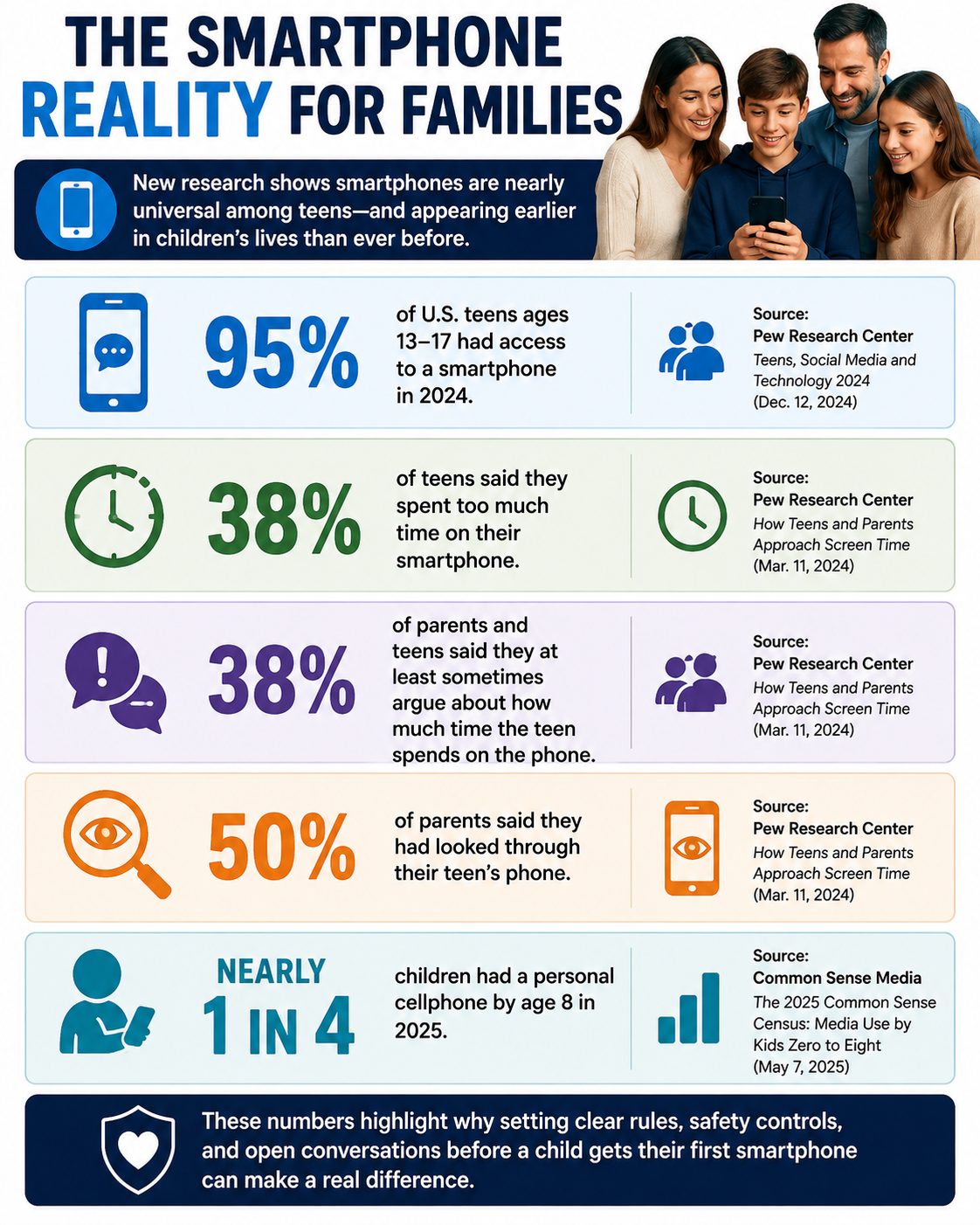
Giving a child their first smartphone can solve a practical problem—suddenly they can call after practice, text when plans change, and reach you in an emergency. But it also places apps, messaging, cameras, location sharing, purchases, strangers, and a nearly unlimited internet connection in their pocket. Smartphone access is nearly universal among teenagers: Pew Research Center found 95% of U.S. teens ages 13 to 17 had access to one in 2024. And the transition is beginning much earlier for some families, with Common Sense Media’s 2025 census finding nearly one in four children had a personal cellphone by age 8. Before activating a child’s first smartphone, parents can make six decisions that may prevent some of the biggest arguments and safety problems later.

1. Decide Whether Your Child Needs a Smartphone—or Just a Phone

There is no single age at which every child suddenly becomes ready for a smartphone. The American Academy of Pediatrics recommends considering the child’s maturity, how they plan to use the device, and whether they’re prepared for problems that can accompany internet access rather than relying solely on age. Start with the problem you’re actually trying to solve: Does your 10-year-old need to contact you after soccer practice, or do they need unrestricted access to social media, games, web browsers, and app stores? Those are very different needs, and a basic phone, calling-enabled watch, or more restricted device may solve the first without automatically providing the second. Think of smartphone access as something that can expand over time rather than a package of privileges that must all arrive on the child’s birthday.

Is Your Child Smartphone Ready?

QuestionWhy It Matters
Do they usually follow household rules?Phone limits require self-control
Can they keep track of belongings?Smartphones are expensive and portable
Will they tell you when something online feels wrong?Secrecy can make problems harder to address
Can they stop using screens when asked?Transitioning away from the device matters
Do they understand basic privacy?Phones collect and share substantial information
Do they actually need internet/app access?Communication may require only a basic device
Can they handle gradually increasing freedom?Controls can loosen as responsibility improves

The American Academy of Pediatrics actually offers families a PhoneReady questionnaire designed to assess behavior, developmental maturity and family values rather than declaring one universal “right age.”

2. Write the Smartphone Rules Before the Phone Arrives

Trying to establish limits after a child has spent three unrestricted weeks with a new smartphone can be much harder than agreeing on expectations beforehand. It is recommended that families create screen-free zones, use parental controls, turn off unnecessary notifications and autoplay, protect bedtime, and establish rules that apply to adults as well as children. Decide whether phones are allowed at dinner, during homework, after bedtime and behind closed bedroom doors, as well as who can approve new apps and purchases. Also establish consequences in advance—for example, downloading an unapproved app might temporarily remove app-store access rather than triggering an unpredictable punishment invented during an argument. Put the rules in writing, revisit them periodically, and loosen restrictions when your child demonstrates that they can handle additional independence.

A First-Phone Agreement Should Cover

  • Bedtime: Where does the phone charge overnight?
  • Apps: Who approves downloads?
  • Purchases: Are in-app purchases allowed?
  • Social media: Which platforms, if any, are permitted?
  • Location: Who can see the child’s location?
  • Privacy: What information should never be shared?
  • School: When must the phone stay away?
  • Monitoring: What are parents allowed to review?
  • Consequences: What happens when a rule is broken?
  • Emergency rule: When can the child come to a parent without fearing immediate loss of the phone?

3. Set Up Privacy, Purchases and Parental Controls Together

Don’t hand over a factory-fresh smartphone and assume the default settings are appropriate for a child. Before the device becomes everyday equipment, review app-download permissions, purchases, location sharing, contacts, web filtering, screen-time limits, camera and microphone permissions, account recovery information, and parental controls. For children under 13, the federal Children’s Online Privacy Protection Act provides protections involving how covered websites and online services collect personal information, including parental-consent requirements in applicable circumstances. Make app permissions a teaching exercise: if a simple game wants permanent access to contacts, photos, microphone and precise location, ask your child why the app might want those things and whether they’re necessary. Setting controls together makes the process less about secretly watching a child and more about teaching them the privacy questions they’ll eventually need to answer without you.

4. Teach the “Show Me, Don’t Hide It” Rule

A child’s first uncomfortable smartphone experience may not involve an obvious stranger asking suspicious questions. It could be a classmate sharing an embarrassing photo, a fake “free gift” text, a phishing link, sexual content appearing unexpectedly, pressure to send a private image, bullying in a group chat, or an adult pretending to be younger. The Federal Trade Commission recommends teaching children not to respond to unknown senders, click unexpected links or attachments, or provide personal or financial information in response to unsolicited messages. Parents should also establish one crucial rule: if something frightening, sexual, threatening, embarrassing or suspicious appears, the child can show an adult without automatically losing the phone simply for reporting it. A child who believes asking for help guarantees punishment has a powerful incentive to hide exactly the situation a parent most needs to know about.

5. Give the Phone a Bedtime—and a Place to Sleep

One of the easiest smartphone boundaries to understand is that the phone doesn’t need to sleep beside the child. You should aim for screen-free periods before bed and emphasize protecting sleep when families develop media plans. Choose a consistent charging location outside the bedroom—a kitchen counter, hallway charging station or parent’s room—and decide when the phone goes there each night. This removes the temptation to answer one more message, watch another video or respond to notifications after lights-out without requiring parents to police every minute of screen use. The rule will also be easier to defend if adults occasionally put their own phones away and demonstrate that being unreachable for part of the evening is normal.

6. Decide How Monitoring Will Change as Your Child Gets Older

Giving a child a smartphone should begin an ongoing conversation rather than end parental involvement. Pew Research Center found half of surveyed parents had looked through their teen’s phone, but monitoring was much more common among parents of 13- and 14-year-olds than parents of 15- to 17-year-olds. Tell your child upfront what you may review—apps, screen time, purchases, contacts or other activity—rather than secretly inventing surveillance rules after a problem occurs. Schedule brief check-ins during the first few months to talk about new apps, strange messages, social pressure, screen habits and anything online that has made the child uncomfortable. As judgment improves, parents can gradually loosen controls so that the smartphone becomes practice for independent digital decision-making rather than a device that remains permanently controlled by an adult.
Smartphone Reality

The 10-Minute First Smartphone Setup

Before your child starts using the phone:

  1. Turn on parental controls.
  2. Require approval for app downloads and purchases.
  3. Review location-sharing settings.
  4. Check camera, microphone, photo and contact permissions.
  5. Configure web/content restrictions appropriate for the child.
  6. Set screen-time or downtime schedules.
  7. Turn off unnecessary notifications and autoplay.
  8. Establish the overnight charging location.
  9. Add important family/emergency contacts.
  10. Review the family’s “show me, don’t hide it” rule.

The FTC specifically encourages parents to decide what children may do with the phone, who may contact them, what apps they can download and what parental-control features are appropriate.

A First Smartphone Should Come With Training Wheels

A child’s first smartphone does not have to arrive with unrestricted access to every feature the device offers. Parents can begin with communication and essential apps, add privileges gradually, and adjust controls as a child demonstrates responsibility. It’s a good idea to treat a first phone somewhat like an experiment, with independence increasing as children show they’re ready for it. The most important preparation may not be a particular parental-control setting at all, but establishing a relationship in which children know they can ask for help when something online goes wrong. The goal isn’t to control every tap forever; it’s to help a child eventually use the technology safely without needing you to do it for them.

How old was your child when they got their first phone, and what’s the one rule you wish you’d established from day one?

What to Read Next

Why Some Parents Are Delaying Smartphones Longer Than Ever

Should Your Child Really Have a Smartphone Before School Starts?

Phone-Free Schools Act: New Policies Limit Student Smartphone Use to Curb Distraction and Cyberbullying

Evan Morgan

Evan Morgan has been a full-time freelance writer and editor for 10+ years. When not working, he enjoys catching the latest true crime documentary or getting lost in a good book.


Filed Under: Parenting Tagged With: child safety, children and technology, digital parenting, first smartphone, Internet Safety, Online Safety, parental controls, Parenting, Screen Time, smartphones

6 Gaming Settings That Can Stop Surprise Kid Purchases

July 28, 2026 | Leave a Comment

Child Gaming
A parent should review purchase approval and parental control settings on a gaming device while a child plays nearby, highlighting simple steps that can reduce the risk of unexpected in-game spending. (Pexels).

Parents often hand a gaming console, tablet, or smartphone to a child without thinking twice, only to discover unexpected charges later. In-game purchases have become a standard part of modern gaming, making it easy for kids to spend real money with just a few taps. While no single feature can stop every unauthorized purchase, enabling the right gaming parental controls can significantly reduce the risk. Here are six practical settings every parent should review before the next gaming session.

1. Turn On Purchase Approval for Child Accounts

The most effective first step is creating a dedicated child account instead of letting kids play on an adult profile. Apple’s Ask to Buy feature and similar family approval tools on Google Play, Xbox, PlayStation, and Nintendo require a parent to approve many purchases before they are completed. This extra step can reduce accidental spending when a child mistakes virtual currency for play money or taps a purchase button out of curiosity. Families who share devices often overlook this setting until an unexpected credit card notification appears. Because setup varies by platform, game, and account type, it is worth reviewing your family management settings before handing over a device.

2. Require a Password or Biometric Confirmation for Every Purchase

Many gaming devices allow purchases using a saved payment method, making checkout nearly effortless. Requiring a password, fingerprint, or facial recognition for every transaction adds another layer of protection against accidental purchases. Even older children can unintentionally buy digital items when games promote limited-time offers or virtual currencies. This simple setting takes only a few minutes to enable but can prevent costly mistakes. Removing saved payment methods entirely offers an additional safeguard for shared devices.

3. Disable In-Game Purchases Whenever Possible

Several gaming platforms and mobile operating systems let parents block in-app purchases through parental controls. This option is especially helpful for younger children who may not understand that virtual currency costs real money. Popular games like Roblox, Fortnite, and many mobile titles regularly encourage players to buy cosmetic items, battle passes, or digital currency. Turning off purchases removes much of the temptation without affecting basic gameplay in many games. The exact steps vary depending on your device, operating system, and account settings.

4. Remove Stored Credit Card Information

Saving a payment method makes buying games convenient for adults, but it also makes accidental purchases easier. Parents who share devices with children should consider removing stored cards or using prepaid gift cards with limited balances instead. This creates a built-in spending limit that helps minimize financial surprises. Some families only add payment information when making planned purchases and remove it immediately afterward. Although it requires an extra step, this habit can offer valuable peace of mind.

5. Review Spending and Family Notifications Regularly

Most major gaming ecosystems provide purchase history, spending notifications, or family activity reports. Reviewing these reports regularly helps parents identify unusual transactions before they become larger financial problems. It also creates opportunities to teach children about responsible digital spending habits. Rather than reacting after a surprise credit card bill arrives, families can make digital budgeting part of normal conversations. Ongoing awareness is one of the best defenses against unexpected purchases.

6. Talk About Virtual Currency Before Problems Happen

Even the best gaming parental controls cannot replace honest conversations about online spending. Many younger players do not fully understand that Robux, V-Bucks, gems, or coins represent real money linked to a parent’s payment method. Explaining how virtual purchases work helps children understand the real-world cost behind digital items. Parents can also establish simple household rules, such as asking permission before every purchase. Developing these habits early encourages smarter financial decisions as children grow.

Small Changes Can Make a Big Difference

Unexpected gaming charges can happen on nearly any platform, but they are often avoidable with a few simple precautions. Enabling gaming parental controls, requiring purchase authentication, disabling unnecessary in-app purchases, removing stored payment methods, monitoring account activity, and discussing digital spending all work together to reduce risk. No setting guarantees every unauthorized purchase will be prevented, and refund eligibility depends on the policies of each platform and individual circumstances. Taking a few minutes to review your gaming accounts today could save both money and frustration later.

What gaming parental controls have worked best for your family, or have you ever been surprised by an unexpected in-game purchase? Share your experience in the comments and help other parents protect their wallets.

What to Read Next

Why Some Parents Are Delaying Smartphones Longer Than Ever

California Families Are Ditching Screen Limits for Coding Camps

How Utah Families Are Rethinking Summer Screen Time

Evan Morgan

Evan Morgan has been a full-time freelance writer and editor for 10+ years. When not working, he enjoys catching the latest true crime documentary or getting lost in a good book.

Filed Under: Technology Tagged With: child safety, family gaming, gaming parental controls, gaming tips, in app purchases, mobile gaming, Nintendo, Online Safety, parental controls, Parenting, PlayStation, Xbox

Online Safety Experts Urge Parents to Check These Apps Before Summer Begins

June 8, 2026 | Leave a Comment

TikTok
A parent should review apps on a child’s smartphone before summer break, highlighting the importance of checking privacy settings, messaging platforms, and social media accounts to improve online safety for kids. (Pexels).

As summer break approaches, many children and teens will spend more time on their phones, tablets, and gaming devices. That increase in screen time can also increase exposure to online risks that often go unnoticed by busy parents. Online safety experts consistently warn that some of the most popular apps among young users can expose them to cyberbullying, inappropriate content, scams, and contact from strangers. Taking a few minutes to review the apps installed on your child’s device before summer begins can help create a safer digital environment. For families focused on online safety for kids, now is the ideal time to start the conversation.

Discord: Not Just for Gamers Anymore

Discord started as a communication platform for gamers, but it has evolved into a massive social platform with millions of users. Children can join public servers, participate in voice chats, and communicate with strangers who share similar interests. While many communities are harmless, experts continue to raise concerns about grooming, cyberbullying, and exposure to inappropriate content. Parents are often surprised to learn that private messages and voice channels can make supervision difficult. Before summer starts, review privacy settings and discuss who your child communicates with on the platform.

Snapchat: Disappearing Messages Can Create Real Problems

Snapchat remains one of the most popular apps among teenagers, largely because messages and photos disappear after being viewed. While that feature may seem harmless, experts warn it can encourage risky behavior because users may believe their content is temporary. Screenshots and third-party tools can still preserve messages, making the disappearing feature less secure than many teens assume. Safety advocates also point to concerns involving sextortion, bullying, and contact from unknown users. Parents should regularly review privacy settings and ensure only trusted friends can contact their children.

TikTok: Entertainment With Hidden Risks

TikTok offers endless entertainment through short-form videos, but experts say parents should look beyond the fun content. The platform’s algorithm can quickly expose users to mature topics, dangerous challenges, or misleading information. Although TikTok has expanded parental controls and safety features, no platform can completely filter harmful content. Children may also feel pressure to participate in viral trends that could affect their physical safety or emotional well-being. Monitoring screen time and discussing responsible content consumption can significantly improve online safety for kids.

Instagram and CapCut: Creative Apps With Privacy Concerns

Many young users create videos and photos using Instagram and CapCut, a popular editing app often connected to social media sharing. While these apps encourage creativity, they can also expose children to public comments, direct messages, and unrealistic social comparisons. Experts note that young users may accidentally reveal personal information through photos, captions, or location tags. Some children also experience anxiety from constantly comparing themselves to influencers and online personalities. Parents should review account privacy settings and talk openly about digital self-esteem and personal boundaries.

Hidden Messaging and Anonymous Apps Deserve Extra Attention

Online safety specialists frequently advise parents to watch for anonymous messaging apps and hidden vault apps. These tools may disguise themselves as calculators, folders, or harmless utilities while secretly storing messages, photos, or videos. Anonymous platforms can increase the risk of cyberbullying because users often feel less accountable for their behavior. Some apps also make it easier for strangers to contact minors without revealing their identity. A quick review of installed apps can help parents identify anything unfamiliar before summer break begins.

Simple Steps Parents Can Take Right Now

Protecting children online does not require becoming a technology expert overnight. Start by checking app permissions, reviewing privacy settings, and enabling parental controls on devices. Consider using trusted monitoring tools if appropriate, but remember that communication remains the most effective safety strategy. Research shows many children encounter online threats without telling their parents, making regular conversations essential. When families discuss digital safety openly and without judgment, children are more likely to seek help when something feels wrong.

The Summer Safety Check Every Family Should Make

Summer should be a time for fun, learning, and making memories—not dealing with preventable online dangers. By reviewing the apps your children use and staying involved in their digital lives, you can reduce many common risks before they become serious problems. Online safety for kids is not about banning technology; it is about teaching responsible use and maintaining healthy boundaries. Even a simple 15-minute device review can reveal privacy settings, contacts, or apps that deserve closer attention. The most effective protection often comes from informed parents and ongoing conversations.

What apps have you discovered on your child’s phone that surprised you, and how do you approach conversations about digital safety at home? Share your thoughts and experiences in the comments below.

What to Read Next

Consumer Watchdogs Warn: 6 Kids Apps Draining $50+ Monthly Without Parent Permission

The 5 Educational Apps That Teachers Say Are Actually Hurting Grades

8 Children’s Apps That Are Secretly Tracking More Than Location

Evan Morgan

Evan Morgan has been a full-time freelance writer and editor for 10+ years. When not working, he enjoys catching the latest true crime documentary or getting lost in a good book.

Filed Under: Parenting Tagged With: Cyberbullying, Discord, Instagram, online safety for kids, parental controls, parenting tips, Snapchat, social media safety, summer safety, tiktok

8 Children’s Apps That Are Secretly Tracking More Than Location

January 8, 2026 | Leave a Comment

8 Children’s Apps That Are Secretly Tracking More Than Location
Image source: shutterstock.com

It’s easy to think the biggest risk on a kid’s phone is location sharing, but that’s only one small piece of the puzzle. Many children’s apps can also collect behavioral data that reveals routines, interests, and what keeps a child engaged. Some of that tracking supports core features, but plenty of it can also feed analytics, personalization, or advertising systems. The tricky part is that it’s often buried in settings, permissions, or privacy policies nobody reads during a hectic download moment. Here are eight popular apps kids use that may be gathering far more than expected, plus simple ways to tighten things up.

1. TikTok

TikTok can collect detailed engagement signals like what videos a child watches, replays, skips, or interacts with, which helps power recommendations and ad-related profiling. It can also collect device and network details (not just GPS), which can still reveal patterns about when and how the app is used. That means the “tracking” story often isn’t about location—it’s about behavior and preferences over time. To tighten this up, use the strongest privacy settings available, turn off ad personalization where possible, and keep permissions limited to what’s needed. If a child doesn’t need contacts access or constant background permissions, those are easy “no” choices that reduce data flow.

2. Roblox

Roblox can process information about what a user does on the platform and may use personal information to personalize ads and measure ad effectiveness. That tracking can include platform usage and identifiers that help decide what gets shown and what performs best. Even without “location,” play habits, purchases, and social interactions can create a surprisingly detailed profile. A practical move is to review privacy settings, restrict chat and friend features if they aren’t needed, and limit ad-related options where available.
Also treat “free” in-game perks and events like a signal to double-check what data the experience relies on.

3. YouTube Kids

YouTube Kids is one of the children’s apps that collects data. It can track activity such as watch and search history and uses a unique app identifier tied to activity to recommend content. It also uses unique identifiers for contextual advertising (even though it doesn’t allow interest-based ads in YouTube Kids). So even when a parent thinks, “It’s just videos,” the app can still track behavior patterns like what the user is replaying and what they’re skipping. To reduce data buildup, pause or clear watch/search history inside parental settings and use signed-out mode if the household doesn’t need profiles. Downloading videos for offline viewing (when available) can also cut down on ad-related exposure and tracking signals.

4. Snapchat

Snapchat’s privacy materials describe collecting and using data beyond location, including information tied to how someone uses the service and interacts with content. Its ads-related documentation also makes clear that Snapchat uses data to support advertising and ad controls. Even if a child never shares a map location, patterns like who they message, when they’re active, and what they engage with can still be valuable metadata. The simplest guardrails are limiting permissions (camera only while using the app, not always), turning off ad personalization where possible, and tightening who can contact the account. If “quick add” or public-facing features aren’t necessary, disabling them reduces the amount of social mapping the app can build.

5. Instagram

Instagram’s data policy explains that Meta collects information about how people use its products, including the types of content they view or engage with and the actions they take. That means “tracking” often shows up as engagement and behavior signals, not just location settings. For kids and teens, those signals can quickly turn into highly tuned feeds that keep attention locked in. A practical approach is to make accounts private, limit sensitive permissions, and regularly reset or review ad and recommendation settings. If a child uses Instagram mainly to keep up with friends, turning off unnecessary discovery features can reduce profiling pressure.

6. Discord

Discord’s privacy policy spells out that it can collect device information (like IP address, OS/browser details, and device settings such as microphone/camera) and log/event information about how and when someone uses the service. It also describes collecting information about activities on the service, such as friends added, servers joined, and content interactions. So even without GPS, usage patterns can reveal routines, communities, interests, and social networks. The easiest safety upgrade is limiting who can DM, keeping servers invite-only when appropriate, and restricting microphone/camera permissions to “only while using.” If a child doesn’t need integrations, bots, or third-party add-ons, keeping things “basic” reduces the tracking surface.

7. Messenger Kids

Messenger Kids is designed for child communication managed through a parent account, but messaging children’s apps like this still create rich data trails through communication patterns and usage metadata. Parent-facing guidance emphasizes that caregivers can manage contacts and settings, which matters because who a child can reach is a major privacy lever. Meta’s broader child/parent account disclosures also describe collecting and using child information as part of providing services. A strong default is keeping the friend list tight (known family/friends only), turning off any extras the child doesn’t use, and regularly reviewing the contact approvals. If a messaging app starts asking for permissions that don’t match its job, that’s a cue to pause and reassess before tapping “allow.”

8. Spotify

Spotify explains that it collects “usage data” tied to actions on the service, like what someone plays and how they interact with features. Ad and personalization systems can also rely on identifiers and inferences about interests to make experiences (and ads) more relevant. For kids, listening behavior can reveal moods, routines, and preferences even when no location sharing is enabled. To tighten things up, use a family plan/kid-appropriate setup, review privacy controls, and disable settings that share listening activity publicly. If the goal is background music, turning off social sharing features helps keep “what they listen to” from becoming “what trackable and broadcast.”

The Two-Minute Privacy Tune-Up Parents Can Actually Keep Up With

Start by reviewing children’s apps permissions once a month and removing anything that doesn’t match the app’s job. Turn off ad personalization where possible, limit tracking permissions, and keep Bluetooth and local network access disabled unless needed. Use kid profiles, screen time controls, and app store approval settings so downloads don’t happen on impulse. Talk to kids in plain language about why “free” can come with strings attached. A small routine beats a one-time panic cleanout, and it keeps a family’s digital life calmer.

What’s one app permission parents have started saying “no” to—and did it change how children’s apps behave?

What to Read Next…

7 Kids’ Apps That Can Silently Access Your Camera or Microphone

The Silent Threat: 9 Digital Attacks Experts Say Are Imminent For Kids’ Devices

5 Ways Bullying Apps Are Operating Without School Oversight

Are You Underestimating? 9 Privacy Settings For Kids’ Devices To Change Immediately

The Truth About Screens: 9 Apps Your Kids Use That Secretly Collect Data

Catherine Reed
Catherine Reed

Catherine is a tech-savvy writer who has focused on the personal finance space for more than eight years. She has a Bachelor’s in Information Technology and enjoys showcasing how tech can simplify everyday personal finance tasks like budgeting, spending tracking, and planning for the future. Additionally, she’s explored the ins and outs of the world of side hustles and loves to share what she’s learned along the way. When she’s not working, you can find her relaxing at home in the Pacific Northwest with her two cats or enjoying a cup of coffee at her neighborhood cafe.

Filed Under: Technology Tagged With: app permissions, child safety tech, data tracking, digital parenting, kids’ online privacy, parental controls, screen time tips

11 Ways Kids Are Outsmarting Parental Controls

September 19, 2025 | Leave a Comment

11 Ways Kids Are Outsmarting Parental Controls
Image source: 123rf.com

Parents trust parental control apps and settings to keep their children safe online, but tech-savvy kids are often one step ahead. With curiosity, creativity, and peer advice, they find ways to bypass safeguards that parents thought were foolproof. What may look like innocent screen time can quickly turn into exposure to restricted apps, sites, or conversations. Recognizing how kids are outsmarting parental controls is the first step in reinforcing digital safety.

1. Using Alternate Devices

One common trick is simply turning to another device. If a child’s main phone or tablet is restricted, they may borrow a sibling’s, friend’s, or even a school laptop. This instantly gives them access to content outside of parental oversight. Parents often focus on one device, forgetting that others in the household can serve as loopholes. Knowing this tactic helps families tighten controls across all electronics.

2. Clearing Browsing Histories

Many kids quickly learn that clearing browsing history hides evidence of restricted activity. With just a few clicks, they can erase any trace of websites visited. This makes it harder for parents to notice when rules are being broken. Parents may assume no history means no browsing, but the reality is often the opposite. Kids are outsmarting parental controls by making it seem like nothing happened at all.

3. Using Private Browsing Modes

Most browsers offer “incognito” or private browsing features. Kids use this mode to access websites without leaving a record in the history. To parents checking later, everything looks clean and safe. This simple trick is often one of the first ways kids discover how to bypass restrictions. Conversations about private browsing can help close this gap.

4. Guessing or Resetting Passwords

Children who are persistent may try to guess passwords to parental control apps or accounts. Others may find ways to reset them through email prompts or security questions. Once inside, they can disable restrictions entirely. Parents may not even realize controls have been altered until much later. Stronger, less predictable passwords can make this more difficult.

5. Using VPNs to Hide Activity

Virtual private networks, or VPNs, let kids disguise their online locations. With one downloaded app, they can bypass geographic or parental restrictions. Some children learn about VPNs through friends or even social media. This makes it easy for them to reach content that should be blocked. Parents often underestimate just how simple it is for kids to use these tools.

6. Creating Fake Accounts

When parents monitor social media, kids may create hidden accounts. These “finstas” or fake profiles allow them to interact freely without parental oversight. While their main account appears harmless, the secondary one tells a different story. Kids are outsmarting parental controls by playing both sides at once. Checking for duplicate accounts can help parents stay more aware.

7. Exploiting Time Zone Settings

Some kids change the time zone on their devices to bypass screen time limits. This trick allows them to gain extra hours of usage undetected. Parents may assume controls are working, but in reality, the child is bending the clock. It’s a clever loophole that highlights just how resourceful kids can be. Monitoring device settings regularly can catch this tactic.

8. Disabling or Uninstalling Apps

Parental control apps can be deleted or disabled with surprising ease. Some kids even reinstall them before a parent checks, making it seem like nothing changed. Others may simply restrict permissions to prevent apps from functioning properly. When apps aren’t monitored closely, parents may not notice they’ve been tampered with. This shows the importance of consistent follow-up.

9. Turning to Friends for Access

If a child can’t get past restrictions on their own, they may rely on friends. Visiting a friend’s house or borrowing their phone can give them a free pass. Parents often forget that peer environments can override restrictions set at home. This kind of social workaround is especially common with gaming or social media. Open conversations about trust and responsibility are essential.

10. Hiding Apps in Plain Sight

Kids sometimes download apps that look innocent but serve as gateways to hidden activity. These apps may disguise themselves as calculators or utilities. In reality, they allow file storage, private messaging, or browser access. Parents glancing at a home screen may overlook them entirely. Learning to recognize these disguised apps can help parents stay informed.

11. Outpacing Parents’ Tech Knowledge

Finally, kids often know more about devices than their parents do. Whether through YouTube tutorials, TikTok hacks, or peer groups, they quickly learn advanced workarounds. This knowledge gap means controls can be bypassed before parents even realize the loophole exists. Staying informed and continually learning about new technology is the best defense. Kids are outsmarting parental controls because they adapt faster than most adults.

The Real Solution Lies Beyond Restrictions

While controls and filters are important, no system is perfect. Kids will always find creative ways around barriers, making communication the strongest safeguard. Setting clear expectations, building trust, and having ongoing conversations about online behavior matter more than apps alone. Parents who combine technology with open dialogue create a safer digital environment. The goal isn’t to win a battle of wits but to build a relationship that keeps kids both safe and honest.

Do you think kids are outsmarting parental controls faster than parents can keep up? Share your experiences in the comments below.

What to Read Next…

6 Parenting Tech Shortcuts That Can Expose Your Child to Strangers

How Much Screen Time Is Too Much—Legally Speaking?

Is Your Child’s School Quietly Tracking Their Location Without Your Consent?

How Much Screen Time Is Quietly Reshaping Childhood Behavior?

Why Some Parents Are Being Investigated Over Homeschooling Records

Catherine Reed
Catherine Reed

Catherine is a tech-savvy writer who has focused on the personal finance space for more than eight years. She has a Bachelor’s in Information Technology and enjoys showcasing how tech can simplify everyday personal finance tasks like budgeting, spending tracking, and planning for the future. Additionally, she’s explored the ins and outs of the world of side hustles and loves to share what she’s learned along the way. When she’s not working, you can find her relaxing at home in the Pacific Northwest with her two cats or enjoying a cup of coffee at her neighborhood cafe.

Filed Under: Technology Tagged With: child internet safety, digital parenting, kids and technology, kids are outsmarting parental controls, Online Safety, parental controls

5 Ways Children Are Secretly Spending Parents’ Money Online

September 6, 2025 | Leave a Comment

5 Ways Children Are Secretly Spending Parents’ Money Online
Image source: 123rf.com

It’s easier than ever for kids to access the internet, and with that convenience comes hidden risks. One of the most surprising challenges for families today is children spending their parents’ money online without permission. Whether it’s through games, apps, or shopping platforms, small transactions can add up quickly, leaving parents shocked when they review their monthly statements. Understanding the most common ways this happens can help families take control, set boundaries, and prevent unexpected financial headaches. Let’s take a closer look at where this secret spending often takes place and how parents can protect their wallets.

1. In-App Purchases in Mobile Games

Many children get hooked on mobile games that appear free to play but are filled with opportunities to make purchases. Brightly colored buttons and enticing offers like “unlock this level” or “buy more lives” make it easy for kids to click without realizing they are charging real money. Because credit card details are often stored on devices, children spending their parents’ money online through these apps is becoming alarmingly common. Even small charges, when repeated, can snowball into large bills. Parents can avoid this by disabling one-click payments or requiring password verification for every transaction.

2. Subscription Services That Auto-Renew

Streaming platforms, music apps, and even learning tools often come with free trials that roll into paid subscriptions. Children may sign up for something they find fun or useful, not understanding that the trial isn’t truly free after the first month. As a result, parents often discover ongoing charges for services they never authorized. These types of children spending parents’ money online are sneaky because subscriptions can remain hidden for months before being noticed. Setting up alerts for recurring charges or using parental controls can help catch these before they drain the family budget.

3. Online Shopping Sprees with Stored Accounts

Many households save payment details on shopping platforms for convenience, which makes it easier for kids to make unauthorized purchases. Whether it’s ordering toys, electronics, or trendy clothes, the temptation is strong when everything is just a click away. This form of children spending parents’ money online often leads to large packages arriving at the door, surprising both parents and kids. Because retailers rarely question small accounts with stored cards, children may not even understand the seriousness of their actions. A smart move is to avoid saving card information on shared devices or to use gift cards instead of credit cards.

4. Donations and Support for Online Creators

Kids today love watching streamers, influencers, and content creators, many of whom accept donations through platforms like Twitch or YouTube. With just a few clicks, children can send money directly to support their favorite creators. While the amounts might look small, multiple transactions can add up fast. This is another area where children spending parents’ money online becomes an issue, because the charges often appear as random platform names on bank statements. Parents should review app permissions and discuss the importance of asking before sending money online.

5. Virtual Currency and Cosmetic Upgrades

From Fortnite V-Bucks to Roblox Robux, virtual currency has become a huge business. Kids often want to enhance their gaming experience with unique outfits, special powers, or new characters. Unfortunately, this can lead to children spending parents’ money online to buy items that have no real-world value. The instant gratification of these purchases makes them especially dangerous because kids don’t recognize how quickly costs add up. Parents can help by setting spending limits or using prepaid cards specifically for gaming.

Protecting Your Wallet While Teaching Smart Habits

The reality is that technology makes it easy for children spending parents’ money online to go unnoticed until charges pile up. The good news is that families can safeguard their accounts by enabling passwords, avoiding stored payment details, and regularly checking financial statements. Beyond technical fixes, open communication with kids about money is just as important. Explaining how purchases work and involving children in budgeting decisions can turn these challenges into teachable moments. By blending boundaries with financial education, parents can protect their wallets while raising money-smart kids.

Have you ever caught your kids making online purchases without asking? Share your story and tips in the comments below!

What to Read Next…

10 “Educational” Outings That Uncover Real Financial Strain

Can You Afford to Have Kids in 2025? Here’s What It Really Costs Per Year

10 School Supply Lists That Now Feel Financially Impossible

18 Stupid Things That Kids Do That Costs Their Parents Money

8 Best Cool Toys for Teaching Financial Literacy

Catherine Reed
Catherine Reed

Catherine is a tech-savvy writer who has focused on the personal finance space for more than eight years. She has a Bachelor’s in Information Technology and enjoys showcasing how tech can simplify everyday personal finance tasks like budgeting, spending tracking, and planning for the future. Additionally, she’s explored the ins and outs of the world of side hustles and loves to share what she’s learned along the way. When she’s not working, you can find her relaxing at home in the Pacific Northwest with her two cats or enjoying a cup of coffee at her neighborhood cafe.

Filed Under: Money and Finances Tagged With: Family Budgeting, financial literacy for kids, kids and money, online spending, parental controls, unauthorized purchases

6 Parenting Tech Shortcuts That Can Expose Your Child to Strangers

August 30, 2025 | Leave a Comment

6 Parenting Tech Shortcuts That Can Expose Your Child to Strangers
Image source: 123rf.com

Technology has made parenting more convenient, but those same tools can create new risks that parents often overlook. While apps, devices, and online platforms promise safety and efficiency, they can also open the door to strangers if not used carefully. Many families rely on parenting tech shortcuts to save time, yet these shortcuts can compromise privacy and security. Being aware of the hidden dangers behind these tools is the first step toward protecting your child.

1. Location-Sharing Apps That Overshare

Parents often use apps that allow kids to share their location, believing this keeps them safe. The problem is that some apps make tracking information accessible to more than just parents. Strangers can exploit weak privacy settings and gain access to real-time data about where your child is. Even if the app seems trustworthy, third-party data sharing can expand the risk. Reviewing permissions and limiting who has access is crucial when relying on these parenting tech shortcuts.

2. Smart Speakers Listening In

Many households use smart speakers for homework help, music, or entertainment. However, these devices often record conversations and store them in the cloud. If accounts are not properly secured, strangers or hackers could access sensitive information. Children may unknowingly share details about their school, friends, or routines while chatting with the device. Parents should always check privacy settings and avoid linking personal accounts too freely to these parenting tech shortcuts.

3. Kid-Friendly Tablets with Weak Security

Tablets designed for children often come preloaded with apps and games. While they appear harmless, some apps collect data without clear consent. Free games in particular may expose kids to strangers through chat features or hidden advertising networks. The default settings on these devices rarely prioritize security. Parents should adjust restrictions before handing tablets over, because these parenting tech shortcuts can create digital entry points for outsiders.

4. Social Media Profiles for Young Kids

Some parents create social media accounts for their children to share milestones with friends and family. Unfortunately, these profiles can be discovered by strangers if privacy settings are left unchecked. Photos, names, and even location tags can provide more personal information than parents realize. Once shared, images and posts can be copied or misused without consent. Using these parenting tech shortcuts to simplify sharing may inadvertently expose a child’s personal life to the public.

5. Homework Help Apps That Collect Data

Digital homework helpers seem like a dream come true for busy families. Yet many require account creation, data entry, or even access to a child’s camera and microphone. This data may be sold to advertisers or left vulnerable to breaches. Some apps also allow peer-to-peer interactions that aren’t always closely monitored. Parents should carefully vet any platform, because these parenting tech shortcuts often prioritize convenience over safety.

6. Video Calling Tools Without Supervision

Video chats help kids stay in touch with family and friends, but unsupervised use can lead to risky connections. Many platforms allow users to be contacted by strangers if privacy settings aren’t configured properly. Kids may accidentally accept calls or messages from people they don’t know. Even well-meaning relatives can leave devices unlocked, giving others an opening. Parents should supervise video calls and use parental controls to minimize the risks tied to these parenting tech shortcuts.

Awareness Protects What Shortcuts Can’t

Convenience is tempting, and parenting tech shortcuts can save valuable time. Yet shortcuts should never come at the cost of safety. By paying attention to privacy settings, monitoring device use, and asking tough questions about data collection, parents can stay one step ahead. Technology itself isn’t the enemy, but careless use can expose kids to strangers. Staying vigilant ensures children enjoy the benefits of tech without being put at unnecessary risk.

What parenting tech shortcuts do you rely on, and how do you make sure they stay safe for your child? Share your thoughts in the comments below.

What to Read Next…

How Much Screen Time Is Quietly Reshaping Childhood Behavior?

The Dark Side of Kids’ YouTube You Didn’t See Coming

Are We Giving Our Kids Too Much Freedom Too Soon? Here’s Why You Might Be Wrong

10 Ways Parents Are Accidentally Teaching Entitlement

5 Unintended Consequences Of Keeping A Child Sheltered

Catherine Reed
Catherine Reed

Catherine is a tech-savvy writer who has focused on the personal finance space for more than eight years. She has a Bachelor’s in Information Technology and enjoys showcasing how tech can simplify everyday personal finance tasks like budgeting, spending tracking, and planning for the future. Additionally, she’s explored the ins and outs of the world of side hustles and loves to share what she’s learned along the way. When she’s not working, you can find her relaxing at home in the Pacific Northwest with her two cats or enjoying a cup of coffee at her neighborhood cafe.

Filed Under: Technology Tagged With: child safety, digital parenting, Internet Safety, kids and technology, online privacy, parental controls, parenting tech shortcuts

The Silent Threat: 9 Digital Attacks Experts Say Are Imminent For Kids’ Devices

July 28, 2025 | Leave a Comment

The Silent Threat 9 Digital Attacks Experts Say Are Imminent For Kids Devices
Image source: 123rf.com

Your child’s tablet or smartphone might seem harmless, but behind the screen could lurk serious and fast-approaching risks. Cybersecurity experts warn that kids’ devices are now prime targets for digital attacks, thanks to the growing number of apps, games, and online accounts they use every day. These threats aren’t just about annoying pop-ups or viruses—they can compromise personal data, expose children to predators, and even lead to identity theft. Parents often install basic parental controls and assume they’re covered, but today’s digital dangers require more awareness and stronger defenses. Here’s a closer look at the digital attacks experts say are becoming harder to detect—and more common with every tap and click.

1. Malware Hidden in Kids’ Games

Malware isn’t just something adults need to worry about. Many popular kids’ games, especially free downloads, are loaded with hidden code that can spy on activity or steal data. These malicious programs may track location, monitor microphone use, or collect sensitive details like contact lists. Because kids often accept all permissions without reading them, they’re easy targets. Digital attacks like these are quietly spreading through app stores, making device safety harder to manage.

2. Phishing Attempts in Chat Features

In-game chats and social platforms aimed at kids are increasingly used to launch phishing attacks. Children may receive links from strangers pretending to be friends, offering “free coins” or exclusive features that actually lead to harmful sites. Once clicked, these sites can trick kids into revealing login credentials, emails, or even payment details. Since children don’t always know the signs of a scam, they are especially vulnerable to this form of digital attack. Teaching kids to pause before clicking is one of the best defenses.

3. Identity Theft from Simple App Signups

It sounds dramatic, but even a basic app signup can be the gateway to identity theft. Some games and platforms require full names, birthdates, and emails—all of which can be used to open fake accounts or steal identities. Because kids don’t recognize this information as sensitive, they often share it freely. Hackers target children specifically because their credit histories are clean and rarely monitored. Digital attacks targeting young users for identity theft are rising rapidly as a result.

4. Ransomware Attacks on Family Devices

Ransomware isn’t limited to businesses anymore. Families are now targets, especially those with kids who download apps from unofficial sources. One wrong click can lock a phone or tablet until a ransom is paid—sometimes even affecting shared home networks. These attacks can paralyze all household devices if not contained quickly. As digital attacks evolve, even children’s screens can serve as the entry point for larger threats.

5. Spyware in Educational Apps

Some educational tools and platforms used for school are collecting more data than parents realize. Spyware is often embedded under the radar, gathering detailed analytics on a child’s behavior, preferences, and usage patterns. While marketed as learning enhancement, the line between education and surveillance is blurring. These programs can send data to third parties without proper disclosure. Digital attacks are now quietly piggybacking on tools parents trust.

6. Deepfake Technology for Impersonation

Kids’ photos and voices are increasingly being used to create deepfake content. Cybercriminals can extract video or audio clips from shared media or hacked devices and use them to mimic children convincingly. These deepfakes might be used in scams or to deceive family members and teachers. It’s not just a celebrity problem—kids are vulnerable, too. Digital attacks involving impersonation are evolving faster than most parents can keep up with.

7. Trojan Downloads in YouTube Clone Apps

YouTube clone apps or download tools for offline videos may seem helpful, but many come packed with trojan software. These programs operate behind the scenes, giving hackers access to everything from your child’s photos to your Wi-Fi credentials. Kids often download these tools without knowing the risks. Once installed, these trojans can be nearly invisible and hard to remove. Digital attacks often start with what looks like convenience.

8. Unsecured Smart Toys and Wearables

Smart toys, watches, and fitness trackers designed for kids can also open doors to digital harm. Many of these gadgets connect to cloud services that lack proper encryption, meaning data can be intercepted. Hackers may track a child’s location, conversations, or even interact with them through the toy. It’s one of the more disturbing ways digital attacks are reaching into playtime. Not all smart tech is safe, even when it’s made for kids.

9. Adware That Turns into Something Worse

Annoying pop-up ads aren’t always just about ads. Some adware is designed to install other malware in the background or redirect browsers to explicit or dangerous content. Once it’s on a device, it can be hard to eliminate without a complete reset. Kids who use free gaming sites or apps with lots of ads are most at risk. What starts as a simple annoyance can become one of the stealthiest digital attacks kids face.

The Best Defense Starts with Awareness

The best way to protect your child from digital attacks is by staying informed and involved. These threats are no longer limited to adult work laptops or shady websites—they’re woven into the apps and devices kids use daily. It’s not about living in fear, but about creating a family routine around digital safety. Talk to your children, review their downloads, and keep security software updated. When kids know what to avoid and parents know what to look for, everyone is better protected.

Which digital safety rules have you found most helpful in your household? Share your best tips in the comments to help other families stay safe.

Read More:

Are They Listening? 7 Kid Gadgets Secretly Recording Your Family

Digital Safety: 6 Steps to Safeguard Your Child’s Online Identity

Catherine Reed
Catherine Reed

Catherine is a tech-savvy writer who has focused on the personal finance space for more than eight years. She has a Bachelor’s in Information Technology and enjoys showcasing how tech can simplify everyday personal finance tasks like budgeting, spending tracking, and planning for the future. Additionally, she’s explored the ins and outs of the world of side hustles and loves to share what she’s learned along the way. When she’s not working, you can find her relaxing at home in the Pacific Northwest with her two cats or enjoying a cup of coffee at her neighborhood cafe.

Filed Under: Parenting Tagged With: child online safety, digital attacks, internet safety for kids, kids' device protection, malware prevention, parental controls, smart toy security, tech safety tips

Beyond The Screen: 8 Privacy Settings On Kids’ Streaming Services To Change Now

July 27, 2025 | Leave a Comment

Beyond The Screen 8 Privacy Settings On Kids Streaming Services To Change Now
Image source: 123rf.com

Streaming services have become the go-to source of entertainment for kids—but with convenience comes hidden risks. Behind every fun cartoon or educational video is a digital platform collecting data, tracking habits, and shaping what your child sees next. Many parents assume kids’ profiles are safe by default, but that’s rarely the case. If you haven’t reviewed the privacy settings on kids’ streaming services recently, your child’s information could be more exposed than you think. A few simple changes can protect their data, limit unwanted content, and give you more control over what’s really happening behind the screen.

1. Disable Personalized Ads

Most streaming platforms gather viewing habits to target kids with “personalized” ads, which may include everything from sugary snacks to branded toys. This marketing is based on algorithms that track what your child watches, how long they watch it, and even when they pause. Disabling personalized ads not only reduces this influence, it also limits the amount of data collected. Look for this setting in your account’s privacy or advertising preferences. Adjusting this option is one of the easiest and most effective privacy settings on kids’ streaming services to change now.

2. Turn Off Watch History Tracking

While viewing history can help recommend similar shows, it also means your child’s activity is constantly monitored and stored. Many parents don’t realize that this information is used to build behavioral profiles. You can usually disable watch history in your settings or choose to clear it regularly. This gives your child a clean slate and stops the platform from feeding them more of the same content repeatedly. Removing watch history helps protect their digital footprint and cuts back on algorithm-driven content loops.

3. Set Content Restrictions By Age

Streaming platforms often allow you to restrict content by rating or age group, but these settings aren’t always turned on automatically. If your child’s profile isn’t set with clear boundaries, they could be exposed to shows with mature themes, violence, or language. Adjusting these filters ensures that content is age-appropriate and aligns with your family’s values. You can typically choose from settings like “TV-Y,” “TV-G,” or custom levels based on age ranges. This is one of the most critical privacy settings on kids’ streaming services to manage right away.

4. Turn Off Autoplay

Autoplay keeps the content coming without pause, which may seem convenient—but it also encourages binge-watching and reduces your control over what’s next. It’s easy for a child to go from a harmless cartoon to something less suitable without ever clicking a button. Disabling autoplay gives your child (and you) a natural break between episodes and helps them become more intentional about what they watch. Most services have autoplay controls hidden under playback or accessibility settings. Turning this off not only protects attention spans but also prevents exposure to surprise content.

5. Review and Limit Profile Access

Many streaming platforms let users switch between profiles easily, and some kids quickly figure out how to bypass restrictions. Make sure your non-child profiles are password protected and that your kids can’t access unrestricted adult content. Some platforms offer profile lock features or require PINs for switching. Enabling this setting helps you maintain the privacy controls you’ve already put in place. This is one of those often-overlooked privacy settings on kids’ streaming services that can make a big difference.

6. Manage Search Capabilities

Allowing unrestricted search can lead kids down digital rabbit holes that expose them to inappropriate or questionable results. If your child’s profile has search access, they can easily stumble across titles you didn’t approve. Limiting or disabling search entirely, where possible, keeps content browsing within your chosen categories. Some platforms let you block search within kid accounts or limit it to curated suggestions only. It’s a small change that adds a big layer of protection.

7. Opt Out of Data Sharing With Third Parties

Buried in the terms and conditions is often a clause that allows the platform to share user data with advertisers, partners, and analytics companies. Even kid accounts are often not exempt unless you specifically opt out. Go into your account settings and look for privacy or data usage sections. You’ll often find options to limit or completely prevent third-party data sharing. When it comes to privacy settings on kids’ streaming services, this one is key for keeping your child’s personal data from being sold or tracked.

8. Monitor and Adjust Viewing Recommendations

Streaming platforms use viewing data to curate suggestions—but those suggestions aren’t always kid-friendly, even on a child’s profile. Sometimes, titles with adult humor or scary scenes still make their way onto the homepage. Go through the recommended content and flag anything that doesn’t meet your standards. You can usually hide specific titles, remove them from recommendations, or refresh suggestions entirely. This keeps your child’s experience clean, safe, and more aligned with what you actually want them watching.

Small Tweaks, Big Impact

You don’t need to ban streaming to protect your child’s digital space—just get smarter about managing it. The default settings on most platforms favor convenience and data collection, not privacy or safety. By reviewing and updating the privacy settings on kids’ streaming services, you’re not just controlling content—you’re protecting your child’s digital identity. These tools are meant to serve your family, not the other way around. A few clicks today can give you peace of mind for months to come.

Have you adjusted the privacy settings on your child’s streaming service? Which changes made the biggest difference in your home? Share your experience in the comments!

Read More:

9 Privacy Settings You Didn’t Know Existed for Kids’ Devices

The Real Reason: Your Child’s Favorite Toy Is Secretly Spying

Catherine Reed
Catherine Reed

Catherine is a tech-savvy writer who has focused on the personal finance space for more than eight years. She has a Bachelor’s in Information Technology and enjoys showcasing how tech can simplify everyday personal finance tasks like budgeting, spending tracking, and planning for the future. Additionally, she’s explored the ins and outs of the world of side hustles and loves to share what she’s learned along the way. When she’s not working, you can find her relaxing at home in the Pacific Northwest with her two cats or enjoying a cup of coffee at her neighborhood cafe.

Filed Under: Parenting Tagged With: digital parenting, kids streaming safety, online safety for kids, parental controls, privacy settings on kids' streaming services, screen time tips, streaming platforms

Beyond The Game: 9 Online Games Kids Are Playing That Expose Them To Predators

July 26, 2025 | Leave a Comment

Beyond The Game 9 Online Games Kids Are Playing That Expose Them To Predators
Image source: 123rf.com

For many kids, online games are more than just entertainment—they’re social spaces, creative outlets, and sometimes a second home. But lurking behind those avatars and usernames can be people with far more dangerous intentions. Many online games kids are playing today come with unmoderated chat functions or open forums, making it easy for predators to make contact and build false trust. Even the most innocent-seeming platforms can be breeding grounds for inappropriate messages, grooming behavior, or manipulation. Knowing which games carry these risks is the first step to protecting your child without taking away the fun.

1. Roblox

Roblox is one of the most popular online games kids are playing, but its vast network of user-created games makes it hard to regulate. While many experiences are harmless, others allow open chat where strangers can engage with children. There have been numerous reports of inappropriate language, solicitations, and even attempts at grooming. Parents can activate parental controls, but many kids bypass them or don’t understand the risk. Supervision and communication are key when your child spends time in Roblox’s virtual worlds.

2. Fortnite

With its vibrant visuals and fast-paced action, Fortnite has millions of young players globally. But its in-game voice and text chat can expose kids to interactions with adults pretending to be fellow gamers. Predators often use these channels to build relationships under the radar. Fortnite also encourages long play sessions, increasing the chance for ongoing contact. It remains one of the riskiest online games kids are playing if parental controls aren’t actively used.

3. Minecraft (Public Servers)

Minecraft’s offline mode is safe, but public servers can be a different story. On these open platforms, players of all ages interact freely, often with no age verification. Some predators create fake servers designed specifically to lure kids in with promises of rare items or secret content. These areas are less moderated and can include disturbing or inappropriate behavior. Be cautious of which servers your child accesses and encourage them to stick to ones you’ve reviewed together.

4. Among Us

While Among Us seems lighthearted and simple, its chat feature creates room for risky interactions. The anonymous nature of the game lets players connect with strangers quickly. While the conversations are usually centered around gameplay, it doesn’t take much for someone to shift the tone. Mods and private servers often have fewer restrictions, increasing the danger. Despite its cartoon style, it’s one of the online games kids are playing that still requires oversight.

5. Discord (Game Chat Integration)

Discord isn’t a game itself, but it’s commonly used by gamers to communicate while playing. Many online games kids are playing connect directly to Discord, opening unfiltered, real-time conversations. While there are options to set servers to private, many children are invited to public ones where predators pose as peers. Grooming often starts with harmless conversation before escalating into something much more serious. It’s crucial to monitor your child’s Discord use and teach them how to block and report inappropriate users.

6. VRChat

As virtual reality grows in popularity, VRChat has become a go-to for immersive gaming. However, it’s known for its lack of moderation and explicit content. Predators use avatars to approach kids and start inappropriate conversations under the guise of fun. The immersive nature of VR can make the interaction feel more personal, blurring boundaries. It’s one of the more extreme examples of online games kids are playing that can be especially dangerous without supervision.

7. IMVU

IMVU allows players to create avatars and engage in role-playing, chatting, and online dating. While marketed to teens, younger kids often join due to its social appeal and fashion-based features. Conversations can quickly turn inappropriate, with many adult users seeking young participants. The game’s structure makes it easy to fake age and identity. If your child is exploring IMVU, they need to be aware of how to spot and shut down questionable behavior.

8. Omegle (Game Connection Claim)

Omegle is not a game, but it’s often advertised to kids through social platforms as a fun way to “game chat” with strangers. Kids are led to believe it’s part of the broader world of online games that kids are playing. In reality, Omegle connects them with random strangers via video or text, many of whom expose them to explicit content. The site has very little content moderation and is a hotspot for predators. Make sure your child knows Omegle is not safe—no matter what they see on TikTok.

9. Rec Room

Rec Room is a social gaming platform that includes mini-games, virtual hangouts, and creative spaces. It allows real-time voice chat and public room access, which can quickly lead to unwanted contact. The immersive environments encourage interaction with avatars that may be pretending to be kids. Inappropriate language and even harassment are common in unsupervised areas. Rec Room is rising in popularity among the online games kids are playing, but it comes with very real concerns.

Keeping Gaming Fun and Safe

Not all online gaming is bad. In fact, many platforms provide great opportunities for kids to learn, problem-solve, and connect. But as online games kids are playing become more socially integrated, so do the risks. The solution isn’t banning games but building awareness, setting clear boundaries, and keeping open conversations flowing. Equip your child with the confidence and tools to recognize unsafe behavior and speak up. Safety starts with knowledge, not fear.

Which games are your kids currently into? Have you had any safety concerns with them? Let us know in the comments—we’d love to hear your take.

Read More:

9 Online Scams That Mimic Kids’ Games to Trick Them

Digital Safety: 6 Steps to Safeguard Your Child’s Online Identity

Catherine Reed
Catherine Reed

Catherine is a tech-savvy writer who has focused on the personal finance space for more than eight years. She has a Bachelor’s in Information Technology and enjoys showcasing how tech can simplify everyday personal finance tasks like budgeting, spending tracking, and planning for the future. Additionally, she’s explored the ins and outs of the world of side hustles and loves to share what she’s learned along the way. When she’s not working, you can find her relaxing at home in the Pacific Northwest with her two cats or enjoying a cup of coffee at her neighborhood cafe.

Filed Under: Parenting Tagged With: child predators, child protection, gaming safety, internet safety for kids, online games kids are playing, online gaming risks, parental controls, parenting tips

Filter Bypass: 9 Online Threats That Bypass Kid-Friendly Filters

July 18, 2025 | Leave a Comment

Filter Bypass 9 Online Threats That Bypass Kid Friendly Filters
Image source: 123rf.com

Parental controls and kid-friendly filters are a great first step to protect kids online—but they’re not foolproof. Tech-savvy kids, algorithm glitches, and constantly evolving content make it easier than you’d think for inappropriate material to sneak through. A filter bypass can happen in seconds, exposing children to content you thought was blocked. That’s why staying aware of these risks is just as important as setting up digital boundaries. Here are nine common online threats that can slip past kid filters and what you can do to stay ahead of them.

1. Inappropriate YouTube Content Masquerading as “Kids’ Videos”

Some creators disguise adult or violent content using cartoon thumbnails or titles that mimic popular kids’ shows. These fake videos are often tagged in ways that fool algorithms and appear on platforms like YouTube Kids. A filter bypass happens when these videos sneak into the queue despite the platform’s restrictions. Kids may click innocently, expecting Peppa Pig or Minecraft, but get something disturbing instead. Always preview new channels and watch with younger kids whenever possible.

2. Chat Features in Online Games

Games that seem harmless—like Roblox, Minecraft, or even educational platforms—often include live chat or messaging features. These tools can expose kids to unmoderated conversations with strangers, where inappropriate language or grooming attempts may occur. Some game filters try to block offensive words, but users get creative with slang or symbols to bypass them. This type of filter bypass is especially dangerous because it involves real-time interaction. Parents should turn off chat when possible or use platforms with robust moderation.

3. Misleading Ads and Pop-Ups

Free games and apps frequently rely on ads, and not all of them are age appropriate. Even when a game is rated for kids, ads can show violent trailers, dating apps, or misleading download links. Because the ads come from third-party networks, they often escape the app’s own filtering settings. One click can lead kids to sites filled with malware or adult content. To avoid this kind of filter bypass, use premium ad-free versions of games or install reliable ad blockers.

4. Social Media Loopholes

Some kids create accounts on platforms like TikTok, Instagram, or Snapchat by faking their birthdate. Others simply use a parent’s device or borrow login credentials from older friends. Once they’re in, they’re exposed to algorithm-driven content that can quickly escalate from silly videos to explicit or harmful material. Many filters don’t cover social media apps unless they’re manually blocked. Talk with your child about the risks and check device permissions regularly to limit these workarounds.

5. Search Engine Tricks

Even with SafeSearch enabled, kids can find questionable content by using alternate spellings, slang, or vague terms. A filter bypass happens when the search engine doesn’t catch coded phrases or images disguised under innocent keywords. Kids may not even be looking for something inappropriate, but search results can quickly take a wrong turn. Keep browsers set to strict mode and consider using kid-specific search engines like Kiddle or KidRex. It’s also helpful to review recent searches with your child to guide future behavior.

6. Third-Party Browsers on Smart Devices

Some smart TVs, game consoles, and tablets include built-in browsers or allow kids to download their own. These third-party browsers often don’t have the same filtering protections as your home computer. That means a child who can’t access a site on Chrome may be able to view it on another app entirely. This creates an easy filter bypass and makes monitoring much harder. Go through each device in your home and disable or password-protect browsers that aren’t kid-safe.

7. Clickbait Articles and “Related” Content

One article or video can quickly lead to another, thanks to autoplay and related content algorithms. What starts as an educational video on animals could end with a prank video or content meant for much older viewers. Many sites that host clickbait don’t label content clearly, so filters may miss them altogether. Encourage kids to stick with trusted sources, and bookmark safe pages they can return to. Monitoring browser history can also help you catch trends before they become problems.

8. Private Browsing and Incognito Mode

Kids who’ve been online for a while may discover private browsing features, which prevent search history and cookies from being stored. This kind of browsing allows a filter bypass by hiding activity from parental monitoring tools. Even if you’ve blocked explicit sites, private mode can make tracking behavior nearly impossible. Some parental control apps allow you to disable incognito mode completely—consider enabling that setting if it’s available. Teach your child that digital trust goes both ways and why transparency matters.

9. File Sharing and Downloadable Content

Many kids download content like mods for games, eBooks, or free wallpapers from forums or file-sharing websites. These sources are often unmoderated and can include hidden adult content, malware, or pirated materials. Filter settings typically focus on live browsing, not files once they’re downloaded. A filter bypass here can lead to long-term risks if malicious files affect your device. Set download permissions and teach kids to ask before adding anything new to their devices.

Awareness Is Your Best Filter

No filter can replace the watchful eye of a parent. A filter bypass can happen in surprising and subtle ways, and it’s often unintentional on the child’s part. That’s why open conversations, clear boundaries, and age-appropriate digital education are so important. Filters are a great tool, but they should support—not replace—your ongoing involvement. The more you know about these loopholes, the better equipped you are to keep your child safe online.

Have you spotted any filter bypass tricks in your household? Share what you’ve learned and how you handled it in the comments!

Read More:

12 Steps to Secure Your Child’s Digital Footprint for Life

9 Digital Attacks Experts Say Are Imminent for Kids

Catherine Reed
Catherine Reed

Catherine is a tech-savvy writer who has focused on the personal finance space for more than eight years. She has a Bachelor’s in Information Technology and enjoys showcasing how tech can simplify everyday personal finance tasks like budgeting, spending tracking, and planning for the future. Additionally, she’s explored the ins and outs of the world of side hustles and loves to share what she’s learned along the way. When she’s not working, you can find her relaxing at home in the Pacific Northwest with her two cats or enjoying a cup of coffee at her neighborhood cafe.

Filed Under: Parenting Tagged With: child cybersecurity, digital parenting, filter bypass, Internet Safety, kid-friendly filters, online safety for kids, parental controls, protecting kids online

Kid Privacy: 9 Privacy Settings You Didn’t Know Existed for Kids’ Devices

July 18, 2025 | Leave a Comment

Kid Privacy 9 Privacy Settings You Didn't Know Existed for Kids Devices
Image source: 123rf.com

We all want our kids to be tech-savvy—but safe. Today’s devices offer a world of entertainment, education, and connection, but they also carry risks that aren’t always obvious. While most parents know how to set screen time limits or block explicit content, there are lesser-known privacy settings that can make a big difference in keeping your child’s digital world protected. These hidden tools are often buried under layers of menus or labeled in vague tech language that’s easy to overlook. Let’s dig into nine privacy settings that deserve your attention—because your child’s safety is too important to leave to default options.

1. Disable Location Sharing in Game Apps

Many mobile games collect location data by default, even if it doesn’t seem relevant to gameplay. Disabling location sharing in individual app settings prevents strangers from seeing where your child is while playing. This setting is often tucked away under each app’s permissions or privacy section. Some platforms also allow you to turn off location access for all games at once in the device settings. Taking the time to disable location tracking adds a strong layer of safety for kids who love mobile gaming.

2. Turn Off Personalized Ad Tracking

Most parents don’t realize that their child’s device might be gathering data to target them with ads. By diving into the privacy settings on both Android and iOS, you can limit ad tracking or reset the advertising ID. This step stops platforms from building a detailed profile on your child’s behavior and interests. While it won’t eliminate all ads, it greatly reduces the creep factor and helps maintain their digital privacy. It’s a small adjustment with a big impact.

3. Disable Microphone Access for Non-Essential Apps

Some apps request microphone access without a clear need, which can be a red flag. Go through your child’s installed apps and manually revoke microphone permissions for those that don’t need it to function. This ensures no apps are passively listening in or collecting audio data. You’ll usually find this under “App Permissions” in your device’s settings menu. Controlling mic access is one of the smartest privacy settings you can use.

4. Hide Sensitive Content from Search Results

Whether your child uses Google, YouTube, or a smart assistant, sensitive content can still pop up even with parental controls in place. Look for SafeSearch or restricted mode settings to filter results and limit explicit or suggestive material. You can also lock these preferences with a passcode so your child can’t turn them off later. These settings are especially useful for kids doing homework or exploring new topics online. It’s an extra step that can protect them from stumbling across something they weren’t ready to see.

5. Limit Who Can See Their Activity on Shared Platforms

If your child is on shared platforms like Xbox Live, Roblox, or YouTube Kids, privacy settings often allow you to control who can view their profile or activity. You can usually make their account private, restrict friend requests, or hide their online status. This reduces exposure to strangers and helps keep your child’s online presence as minimal as possible. Each platform will have its own path to these options, so it’s worth exploring them thoroughly. Think of it as digital crowd control for your child’s online world.

6. Disable Auto-Join for Public Wi-Fi

Kids may not think twice about joining any Wi-Fi network their device suggests, but public networks can be risky. Most devices allow you to turn off the auto-join feature for unsecured networks. This prevents your child from accidentally connecting to unprotected or malicious Wi-Fi. If your child needs Wi-Fi access on the go, consider setting up a secure hotspot through your own phone instead. This setting protects their data before they even open a browser.

7. Restrict App Store Permissions

It’s easy for kids to stumble into downloads you didn’t approve of. In the privacy settings of both iOS and Android, you can limit access to the app store, require your permission for downloads, or block in-app purchases. This keeps surprise charges and inappropriate apps off your credit card and out of your child’s hands. Some devices also offer content filters by age rating right in the app store settings. Locking down the app store gives you a say in what your child installs and interacts with.

8. Block Access to Camera When Not in Use

Much like microphone access, camera access should be reserved for apps that truly need it. By restricting camera permissions, you reduce the risk of unwanted image capturing or video streaming. Devices let you control this individually per app, often through privacy settings or app permissions. Some parental control apps also allow you to lock the camera entirely during certain hours. It’s a key move for privacy, especially with kids who are still learning boundaries around selfies and video calls.

9. Use a Child’s Apple ID or Google Account with Family Settings

Instead of using your own login or a generic account, set up a child-specific Apple ID or Google account. These offer more detailed privacy settings and better oversight of usage, downloads, and screen time. You’ll also receive notifications for new logins or security changes. Family settings make it easier to monitor your child’s activity while keeping their data secure and age-appropriate. It’s one of the best all-in-one solutions for digital parenting.

The Hidden Settings That Keep Kids Safe

The default settings on most kids’ devices aren’t designed with maximum protection in mind—they’re built for convenience. But with a little digging, you can uncover privacy settings that give you far more control and peace of mind. Whether it’s locking down location sharing or limiting ad tracking, each step adds up to a safer digital experience. As technology evolves, staying informed about these lesser-known tools is key to protecting your child online. Take the time to explore these features now—it could prevent a whole lot of problems later.

Have you discovered any surprising privacy settings on your child’s device? Share your tips with other parents in the comments!

Read More:

12 Steps to Secure Your Child’s Digital Footprint for Life

11 Online Safety Risks Your Preschooler Faces

Catherine Reed
Catherine Reed

Catherine is a tech-savvy writer who has focused on the personal finance space for more than eight years. She has a Bachelor’s in Information Technology and enjoys showcasing how tech can simplify everyday personal finance tasks like budgeting, spending tracking, and planning for the future. Additionally, she’s explored the ins and outs of the world of side hustles and loves to share what she’s learned along the way. When she’s not working, you can find her relaxing at home in the Pacific Northwest with her two cats or enjoying a cup of coffee at her neighborhood cafe.

Filed Under: Parenting Tagged With: child device security, child privacy rights, digital parenting tips, kids online safety, parental controls, privacy settings, safe tech for kids

Next Page »
  • Facebook
  • Pinterest
  • RSS
  • Twitter

Basic Principles Of Good Parenting

Here some basic principles for good parenting:

  1. What You Do Matters: Your kids are watching you. So, be purposeful about what you want to accomplish.
  2. You Can’t be Too Loving: Don’t replace love with material possessions, lowered expectations or leniency.
  3. Be Involved Your Kids Life: Arrange your priorities to focus on what your kid’s needs. Be there mentally and physically.
  4. Adapt Your Parenting: Children grow quickly, so keep pace with your child’s development.
  5. Establish and Set Rules: The rules you set for children will establish the rules they set for themselves later.  Avoid harsh discipline and be consistent.
  6. Explain Your Decisions: What is obvious to you may not be evident to your child. They don’t have the experience you do.
  7. Be Respectful To Your Child: How you treat your child is how they will treat others.  Be polite, respectful and make an effort to pay attention.
Best Parenting Blogs

Most Popular

Baby

9 Unusual Baby Names That Sound Like They Belong to Future CEOs

Evan Morgan
Baby

10 Baby Names That Were Once Considered “Grandparent Names” but Feel Cool Again

Evan Morgan
Target Store

Choking Incident Prompts Recall of 49,000 Target Gigglescape “Under the Sea” Popping Toys

Evan Morgan
Frustrated Girl

Why Some Students on the Spectrum Are Labeled With ODD

Evan Morgan
Coke Bottles

12 Things Kids Took to School in the ’70s That Would Never Be Allowed Today

Evan Morgan

All content on Kids Ain’t Cheap is for entertainment purposes only. By reading this blog, you agree that Kids Ain’t Cheap is not responsible for any actions taken after reading this blog. For the full disclaimer, see our privacy policy.

Please note that Kids Ain’t Cheap has financial relationships with some of the merchants mentioned here. Kids Ain’t Cheap is funded by banner advertising, commission sales and search optimization consulting.

Copyright © 2006–2026 | District Media | All Rights Reserved | Privacy Policy

Copyright © 2026 Runway Pro Theme by Viva la Violette